Table of Contents
- Executive Summary: Why Developers Are Choosing Self-Hosted Vapi Alternatives
- Understanding Vapi.ai: The Managed Voice AI Platform
- Introducing AIO Orchestration: The Premier Open-Source Self-Hosted AI Voice Agent
- Vapi vs. AIO Orchestration: A Detailed Feature-by-Feature Breakdown
- Cost Analysis: The Financial Case for a Self-Hosted Vapi Alternative
- When to Choose Vapi: Speed and Simplicity
- When to Choose a Self-Hosted Solution: Control, Cost, and Compliance
- Your Migration Guide: Moving from Vapi to a Self-Hosted Stack
- Frequently Asked Questions (FAQ)
Executive Summary: Why Developers Are Choosing Self-Hosted Vapi Alternatives
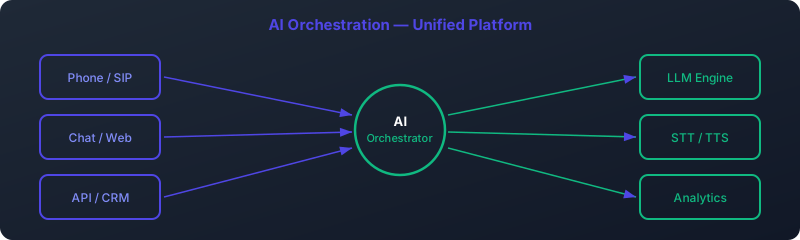
Vapi.ai has undeniably lowered the barrier to entry for creating conversational AI voice agents. Its developer-friendly API and managed infrastructure allow for rapid prototyping and deployment. However, as the voice AI landscape matures and businesses move from proof-of-concept to large-scale, mission-critical applications, the limitations of a closed, consumption-based platform become apparent. By 2026, the conversation is shifting from "how can I build a voice agent quickly?" to "how can I build a voice agent that is secure, scalable, customizable, and cost-effective?"
This is where a Vapi alternative open source solution shines. Developers and businesses are increasingly turning to self-hosted stacks to reclaim control over their data, dramatically reduce operational costs at scale, and achieve unparalleled customization. The primary drivers for this shift are:
- Data Sovereignty & Privacy: In a self-hosted model, sensitive conversation data never leaves your infrastructure, a non-negotiable requirement for industries like healthcare (HIPAA) and finance, and a critical advantage for operating under strict regulations like GDPR.
- Cost at Scale: Per-minute pricing models, like Vapi's, become prohibitively expensive as call volume grows. A self-hosted solution on fixed-cost hardware can reduce monthly expenses by 80-90% or more at scale.
- Ultimate Customization & Control: A self-hosted approach allows you to handpick every component of your stack—from the speech-to-text (STT) model to the Large Language Model (LLM) and text-to-speech (TTS) engine. This eliminates vendor lock-in and opens the door to deep optimization for latency, voice quality, and specific business logic.
This article provides a comprehensive guide to the best self-hosted AI voice agent, a stack we call AIO (AI Open-source) Orchestration. We will compare it directly with Vapi, analyze the costs, and provide a clear migration path for those ready to take full ownership of their voice AI future.
Understanding Vapi.ai: The Managed Voice AI Platform
Before diving into alternatives, it's crucial to understand what Vapi is and who it serves best. Vapi is a managed platform-as-a-service (PaaS) designed to abstract away the complexity of building real-time, conversational voice AI.
What Vapi Does
At its core, Vapi provides a single API endpoint that orchestrates the entire lifecycle of an AI-powered phone call. When a call comes in, Vapi handles:
- Telephony: Managing the phone number and the real-time audio stream (via PSTN or WebRTC).
- Speech-to-Text (ASR): Transcribing the user's speech in real-time, typically using third-party services like Deepgram or Google Speech.
- LLM Integration: Sending the transcribed text to a language model of your choice (like GPT-4o, Claude 3, etc.) for processing.
- Text-to-Speech (TTS): Synthesizing the LLM's text response back into audio, again using services like Deepgram Aura or ElevenLabs.
- Latency Management: Aggressively optimizing the entire process to minimize the delay between when a user stops speaking and the AI starts responding.
Vapi's Pricing Model
Vapi's pricing is consumption-based, which is simple to understand but can scale unpredictably. The cost is a combination of Vapi's base platform fee and the costs of the underlying models you choose.
- Vapi Platform Fee: Starts at $0.05 per minute.
- Model Costs: You pay for the ASR, LLM, and TTS services you use, passed through Vapi. A typical, high-quality setup might add an additional $0.10 - $0.20 per minute.
This results in an all-in cost that generally ranges from $0.15 to $0.25 per minute of call time. While manageable for low volumes, this quickly becomes a significant operational expense.
Target Users
Vapi is an excellent choice for:
- Startups and Hackathons: Teams that need to build and demonstrate a working prototype in hours or days, not weeks.
- No-Code/Low-Code Developers: Individuals who want to integrate powerful voice AI without deep DevOps or telephony expertise.
- Low-Volume Applications: Businesses where the total monthly call volume is expected to remain in the low thousands of minutes.
Introducing AIO Orchestration: The Premier Open-Source Self-Hosted AI Voice Agent
As the definitive Vapi competitor 2026, AIO (AI Open-source) Orchestration represents a philosophical shift towards ownership and control. It's not a single product but a curated stack of best-in-class open-source components that, when combined, create a voice AI platform more powerful, flexible, and cost-effective than any managed service.
The core of the AIO stack consists of four key components running on your own infrastructure:
- Telephony Engine: Asterisk
- What it is: The world's most widely used open-source framework for building communications applications. It's a battle-tested Private Branch Exchange (PBX) that has powered global telephony for over two decades.
- Its Role: Asterisk handles the raw call connection, whether it's a traditional phone call over a SIP trunk or a browser-based call via WebRTC. It manages the audio streams and provides the hook (the Asterisk Gateway Interface or AGI) to connect with our AI logic.
- Speech Recognition (ASR): Whisper (via STT engine)
- What it is: OpenAI's state-of-the-art speech recognition model, renowned for its accuracy across a wide range of accents and languages. We use the `STT engine` implementation for significant performance gains on CPU and GPU.
- Its Role: It listens to the user's audio stream provided by Asterisk and transcribes it into text with very high accuracy. Running this locally on your own GPU is the first step to ensuring data privacy.
- Language Model Orchestration: LLM backend
- What it is: An incredible tool that makes it trivially easy to download, run, and manage powerful open-source LLMs like Llama 3, Mistral, and Mixtral locally.
- Its Role: LLM backend serves the LLM over a simple API. Our orchestration script sends the transcribed text from Whisper to LLM backend, which processes it according to our system prompt and generates a text response. This is the "brain" of our agent, and by using LLM backend, we can swap models in and out with a single command.
- Speech Synthesis (TTS): mixael-TTS-v2 by Coqui
- What it is: A high-quality, low-latency, open-source text-to-speech engine. Its standout features are its natural-sounding voice and its remarkable capability for voice cloning with just a few seconds of audio.
- Its Role: mixael-TTS takes the text response from the LLM and synthesizes it into an audio stream that is played back to the user via Asterisk. Running this locally is the final piece of the puzzle for achieving ultra-low latency and complete data control.
An orchestration script, typically written in Python or Node.js, ties these components together using their respective APIs and the Asterisk AGI, creating a seamless, real-time conversational loop entirely on your own servers.
Vapi vs. AIO Orchestration: A Detailed Feature-by-Feature Breakdown
Choosing between a managed service and a self-hosted solution involves a series of trade-offs. This table breaks down the key differences between Vapi and the AIO Orchestration stack, making it clear why so many are looking for a robust open source Vapi alternative.
| Feature | Vapi | AIO Orchestration (Self-Hosted) |
|---|---|---|
| Pricing | Consumption-based: ~$0.15 - $0.25/minute. Scales linearly and becomes very expensive with volume. | Fixed cost: ~$300-500/month for powerful server(s). Cost per minute approaches zero as volume increases. |
| Data Privacy | Data is processed by Vapi and its third-party subprocessors (OpenAI, Deepgram, etc.). A potential compliance risk. | Complete data sovereignty. All audio and text data remains on your own infrastructure. No third-party exposure. |
| GDPR / HIPAA | Requires careful review of Vapi's DPA and subprocessors. Can be complex to ensure full compliance. | Inherently compliant by design. You are the sole data controller and processor, simplifying compliance immensely. |
| Latency | Highly optimized, but subject to internet latency between multiple cloud services. Typically 400-800ms. | Potentially lower latency by co-locating all services on the same server or VPC, eliminating public internet hops. Achievable target: 300-500ms. |
| Voice Quality | Excellent, but limited to the curated voices offered by integrated TTS providers like ElevenLabs or Deepgram. | Excellent and infinitely customizable. Use mixael-TTS for high-quality voices or clone any voice with just a few seconds of audio for a truly branded experience. |
| Customization | Limited to Vapi's API parameters. You can't change the underlying ASR/TTS models or fine-tune the orchestration logic. | Total control. Swap any component (e.g., use a different ASR), fine-tune LLMs, modify the core orchestration logic, and optimize every millisecond. |
| Scalability | Automatically scales, but at a high and linear cost. You pay for every concurrent call. | Requires DevOps effort to scale (e.g., using Kubernetes with KEDA for GPU nodes), but cost per call decreases dramatically at scale. |
| Setup & Maintenance | Extremely fast setup (minutes). All infrastructure maintenance is handled by Vapi. | Complex initial setup (hours to days). Requires Linux, Docker, and networking knowledge. You are responsible for server maintenance and updates. |
| Support | Official paid support channels and community Discord. | Community-driven support via GitHub, Discord, and forums. For enterprise needs, you can hire specialized consultants. See our support page. |
Cost Analysis: The Financial Case for a Self-Hosted Vapi Alternative
The most compelling argument for a Vapi vs on-premise solution is the staggering cost difference at scale. Let's break down the economics for a moderately busy contact center or application handling 30,000 minutes of call time per month (e.g., 10,000 calls averaging 3 minutes each).
Scenario: 30,000 Minutes / Month
Vapi Cost
Using a conservative all-in rate of $0.20 per minute (which includes Vapi's fee, ASR, a capable LLM, and high-quality TTS):
30,000 minutes/month * $0.20/minute = $6,000 per month
This cost scales directly with usage. If your volume doubles to 60,000 minutes, your bill doubles to $12,000 per month. There are no economies of scale.
AIO Orchestration (Self-Hosted) Cost
For this volume, you would need one or two powerful dedicated servers with GPUs to handle the concurrent load of ASR, LLM, and TTS processing. Let's look at a realistic server configuration:
- Server Provider: Hetzner, Vultr, or similar.
- Specs: Modern CPU (e.g., AMD EPYC), 64GB RAM, and a capable GPU (e.g., NVIDIA RTX 4080 or L40).
- Estimated Monthly Cost: ~$300 - $500 per month for a server that can handle multiple concurrent calls.
Let's use the higher end of that estimate:
$500 per month (fixed)
The difference is stark. In this scenario, switching to a self-hosted Vapi alternative open source solution saves you $5,500 every single month. The initial investment in setup time (or hiring a consultant) pays for itself in the first few weeks of operation.
When to Choose Vapi: Speed and Simplicity
Despite the compelling advantages of self-hosting, Vapi remains the right tool for specific jobs. You should choose Vapi if:
- Your primary goal is speed-to-market for a Minimum Viable Product (MVP).
- You are building a proof-of-concept for an internal demo or hackathon.
- Your expected call volume is very low (less than 2,000 minutes per month).
- Your team lacks the DevOps or backend engineering expertise to manage server infrastructure.
- Data privacy and vendor lock-in are not primary concerns for your specific use case.
When to Choose a Self-Hosted Solution: Control, Cost, and Compliance
A self-hosted AI voice agent is the strategic choice for any serious, long-term application. This is the path for you if:
- Data privacy is paramount. You operate in healthcare, finance, legal, or any field handling Personally Identifiable Information (PII).
- You need to comply with GDPR, HIPAA, or other data sovereignty regulations. Keeping data on-premise is the simplest way to guarantee compliance.
- Your call volume is expected to exceed a few thousand minutes per month. The cost savings are too significant to ignore.
- You require deep customization. You want to use a specific fine-tuned LLM, clone a particular voice, or have granular control over the agent's interruption behavior and logic.
- You are building a core business asset and want to avoid being locked into a single vendor's pricing and feature roadmap.
Your Migration Guide: Moving from Vapi to a Self-Hosted Stack
Migrating from Vapi is a structured process of replicating its managed functionality with your own open-source components. Here is a high-level roadmap.
Step 1: Audit and Deconstruct Your Vapi Agent
Before you build, you must plan. Analyze your existing Vapi implementation:
- Models: Document which ASR, LLM, and TTS models you are using.
- Prompts: Extract your system prompts, first messages, and any other prompt engineering you've done.
- Functions/Tools: List all external API calls (tools) your Vapi agent uses. This is your agent's "skill set."
- Server Logic: Review the code on your backend that interacts with Vapi's webhooks. This logic will need to be adapted.
Step 2: Provision Your Infrastructure
Rent a dedicated server or cloud VM with a GPU. A good starting point for handling 2-4 concurrent calls:
- CPU: 8+ cores
- RAM: 32GB+
- GPU: NVIDIA GPU with 16GB+ VRAM (e.g., RTX 3090/4080, A10G, L4)
- OS: Ubuntu 22.04
Install Docker and the NVIDIA Container Toolkit. This will make deploying the AI components much easier.
Step 3: Deploy the AIO Core Components
Deploy each service, preferably as a Docker container, exposing their respective ports.
# 1. Deploy LLM backend to serve your LLM (e.g., Llama 3)
docker run -d --gpus=all -v ollama:/root/.ollama -p 11434:11434 --name ollama ollama/ollama
ollama pull llama3

# 2. Deploy mixael-TTS-v2 TTS Server
# (Follow instructions from the mixael-TTS GitHub repository to build and run the server)
# Exposes an API endpoint for TTS on a port, e.g., 8020

# 3. Deploy a Whisper ASR Server
# (Use a project like 'whisper.cpp' or a custom Flask wrapper around 'STT engine')
# Exposes an API endpoint for transcription on a port, e.g., 9000

# 4. Install and Configure Asterisk
sudo apt-get install asterisk
# Configure /etc/asterisk/extensions.conf and sip.conf
# to route incoming calls to an AGI script.
For a complete, production-ready guide, check out our step-by-step deployment tutorial.
Step 4: Write the Orchestration Script (AGI)
This is the heart of your new system. Create a script (e.g., `agent.py`) that Asterisk will execute for each call. This script will:
- Use the AGI library to control the call (answer, play audio, listen).
- Stream the user's audio to your local Whisper ASR service.
- Receive the transcribed text.
- Send the text (along with conversation history) to your local LLM backend LLM service.
- Receive the LLM's text response.
- Send this text response to your local mixael-TTS service to generate audio.
- Stream the synthesized audio back to the user via Asterisk.
- Loop this process until the call ends.
This script is where you will also re-implement the logic for calling your external tools/APIs.
Step 5: Test and Go Live
Point a SIP trunk or a test phone number to your new Asterisk server. Make test calls and rigorously evaluate:
- Latency: Measure the "turn-taking" delay.
- Accuracy: Is the ASR and LLM performance on par with your Vapi setup?
- Robustness: Does the system handle dropped words, background noise, and concurrent calls gracefully?
Once you are confident, you can begin migrating production traffic from Vapi to your new, fully-owned self-hosted AI voice agent.