Article Contents
Why XTTS v2 is the Premier Choice for AI Voice Agents
In the world of conversational AI, the perceived intelligence of a voice agent is profoundly influenced by the quality and responsiveness of its voice. A delay of even a few hundred milliseconds can shatter the illusion of a natural conversation. This is where the XTTS voice server, powered by Coqui's XTTS v2 model, emerges as a transformative technology. It's not just another text-to-speech engine; it's a complete toolkit for creating dynamic, responsive, and emotionally resonant AI voices.
The key advantages that make an XTTS v2 setup ideal for demanding applications like real-time voice agents, virtual assistants, and dynamic IVR systems are:
- Expressive and Emotional Speech: Unlike robotic, monotonic TTS systems of the past, XTTS v2 can generate speech with natural intonation, pitch variation, and emotional nuance. This is crucial for creating engaging user experiences.
- High-Fidelity Voice Cloning: With just a few seconds of audio, XTTS v2 can clone a voice with remarkable accuracy. This allows for the creation of unique brand voices, personalized agent personas, or even allowing users to interact with an AI that sounds like them.
- Massively Multilingual: XTTS v2 supports over 17 languages out of the box, including English, Spanish, French, German, Chinese, and Japanese. This enables the development of global voice applications from a single, unified model.
- Streaming-First Architecture: The model is inherently designed for streaming, allowing it to start producing audio almost instantly. This is the secret to achieving ultra-low "time to first byte" latency, which is critical for interactive conversations.
Achieving Real-Time: Performance Benchmarks
The headline metric for any real-time system is latency. For a CoquiTTS voice agent, we're concerned with two key numbers: the time until the user first hears audio (First Chunk Latency) and the total time to generate the full sentence. Our optimized server configuration delivers exceptional results.
These benchmarks were achieved on a server with an NVIDIA A10G GPU for the sentence, "This is a test of the real-time text-to-speech synthesis system." The 84ms first chunk latency is faster than human perception, creating a truly seamless conversational flow. This performance is made possible by a combination of the XTTS v2 model's architecture and powerful optimizations like DeepSpeed TTS.
| Configuration | First Chunk Latency | Total Synthesis Time | Notes |
|---|---|---|---|
| XTTS v2 + DeepSpeed | 84ms | 728ms | Recommended production setup for lowest latency. |
| XTTS v2 (Standard) | ~250ms | ~1100ms | Good performance, but not ideal for real-time interaction. |
| XTTS v2 (CPU Only) | >1000ms | >3000ms | Not recommended for any production or real-time use case. |
Step-by-Step Guide: Building Your XTTS v2 TTS Server
This section provides a complete, technical walkthrough for deploying a high-performance, streaming XTTS voice server. We will cover everything from hardware selection to a production-ready Flask application.
Prerequisites: Hardware and Software
To achieve the low-latency figures mentioned, specific hardware is necessary. While the model can run on a CPU for testing, it is not viable for real-time performance.
- GPU: A modern NVIDIA GPU with at least 4GB of VRAM is the minimum requirement. For optimal performance and to handle concurrent requests, a GPU with 8GB+ VRAM (e.g., RTX 3060, A10G, L4) is highly recommended.
- CPU & RAM: A modern multi-core CPU and 16GB+ of system RAM.
- OS: A recent Linux distribution (Ubuntu 20.04+ recommended) with NVIDIA drivers and CUDA Toolkit installed.
- Software: Python 3.10 or 3.11, `pip`, and `venv`.
Installation with DeepSpeed
We'll set up our project in a clean Python virtual environment to avoid dependency conflicts. The key is installing `TTS` with the necessary extras and then installing DeepSpeed.
# 1. Create and activate a Python virtual environment
python3 -m venv xtts_server_env
source xtts_server_env/bin/activate

# 2. Install PyTorch with CUDA support (adjust for your CUDA version)
# Visit https://pytorch.org/ for the correct command for your system
pip install torch torchvision torchaudio --index-url https://download.pytorch.org/whl/cu118

# 3. Install TTS, Flask, and other dependencies
pip install TTS flask gunicorn

# 4. Install DeepSpeed
# This can be complex. Ensure you have the build essentials and CUDA dev toolkit.
# sudo apt-get install build-essential
pip install deepspeed
Environment Variable Configuration
Before running our server, we must set specific environment variables to enable optimizations. These tell the `TTS` library how to configure the model for maximum performance.
# Set these in your shell before launching the server, or use a .env file
export XTTS_DEEPSPEED=true
export XTTS_COMPILE=false
export XTTS_HALF=false
XTTS_DEEPSPEED=true: This is the most critical variable. It enables Microsoft DeepSpeed inference optimizations, dramatically reducing latency.XTTS_COMPILE=false: Disables `torch.compile()`. While `compile` can be powerful, it adds a significant startup delay and can be unstable with certain GPU architectures. For a server that needs to start quickly, it's best to disable it.XTTS_HALF=false: Disables automatic half-precision (FP16). While FP16 can increase throughput, it can sometimes lead to quality degradation or artifacts. For the highest quality output, we recommend keeping it disabled unless you are severely VRAM-constrained.
Building the Flask API Server
Now, let's create the Python code for our server. We will use Flask for its simplicity. This script will load the XTTS model into memory, manage speaker embeddings, and expose API endpoints for synthesis.
Save the following code as `app.py`.
import os
import time
import torch
import torchaudio
from flask import Flask, request, Response, jsonify
from TTS.tts.configs.xtts_config import XttsConfig
from TTS.tts.models.xtts import Xtts

# --- Configuration ---
MODEL_PATH = "tts_models/multilingual/multi-dataset/xtts_v2"
SPEAKER_WAV_PATH = "speakers/" # Folder to store speaker wav files
OUTPUT_WAV_PATH = "output.wav"
USE_DEEPSPEED = os.getenv("XTTS_DEEPSPEED", "true").lower() == "true"

print("Loading XTTS model...")
config = XttsConfig()
config.load_json(os.path.join(MODEL_PATH, "config.json"))
model = Xtts.init_from_config(config)
model.load_checkpoint(config, checkpoint_dir=MODEL_PATH, use_deepspeed=USE_DEEPSPEED)
model.cuda()
print("Model loaded successfully.")

# --- Speaker Embedding Cache ---
speaker_embedding_cache = {}

def get_speaker_embedding(speaker_name):
    """
    Computes and caches speaker embeddings.
    """
    if speaker_name in speaker_embedding_cache:
        return speaker_embedding_cache[speaker_name]

    speaker_wav = os.path.join(SPEAKER_WAV_PATH, f"{speaker_name}.wav")
    if not os.path.exists(speaker_wav):
        return None

    gpt_cond_latent, speaker_embedding = model.get_conditioning_latents(audio_path=speaker_wav)
    speaker_embedding_cache[speaker_name] = (gpt_cond_latent, speaker_embedding)
    print(f"Computed and cached speaker embedding for: {speaker_name}")
    return gpt_cond_latent, speaker_embedding

# Pre-compute and cache embeddings for all speakers in the folder on startup
print("Pre-computing speaker embeddings...")
for filename in os.listdir(SPEAKER_WAV_PATH):
    if filename.endswith(".wav"):
        speaker_name = filename.split('.')[0]
        get_speaker_embedding(speaker_name)
print("Speaker embeddings cached.")


app = Flask(__name__)

# --- API Endpoints ---

@app.route("/tts", methods=["POST"])
def tts():
    """
    Standard TTS endpoint. Generates a full audio file.
    """
    data = request.json
    text = data.get("text")
    speaker = data.get("speaker", "default") # 'default' should be a wav file in your speakers folder
    language = data.get("language", "en")

    if not text:
        return jsonify({"error": "Text not provided"}), 400

    conditioning_latents = get_speaker_embedding(speaker)
    if conditioning_latents is None:
        return jsonify({"error": f"Speaker '{speaker}' not found"}), 404

    gpt_cond_latent, speaker_embedding = conditioning_latents

    # Perform TTS
    out = model.inference(
        text,
        language,
        gpt_cond_latent=gpt_cond_latent,
        speaker_embedding=speaker_embedding,
        temperature=0.75,
        repetition_penalty=5.0,
        top_k=50,
        top_p=0.85,
    )

    torchaudio.save(OUTPUT_WAV_PATH, torch.tensor(out["wav"]).unsqueeze(0), 24000)

    return jsonify({"message": "TTS completed", "output_path": OUTPUT_WAV_PATH})

# The streaming endpoint will be defined in the next section...
Implementing the Streaming Endpoint
The `/tts` endpoint is useful for non-interactive tasks, but the real power comes from streaming. The `/tts_stream` endpoint will generate audio in chunks and stream them back to the client as they are created. This is the core of a real-time TTS streaming server.
Add the following code to your `app.py` file:
@app.route("/tts_stream", methods=["POST"])
def tts_stream():
    """
    Streaming TTS endpoint. Streams PCM audio chunks.
    """
    data = request.json
    text = data.get("text")
    speaker = data.get("speaker", "default")
    language = data.get("language", "en")

    if not text:
        return jsonify({"error": "Text not provided"}), 400

    conditioning_latents = get_speaker_embedding(speaker)
    if conditioning_latents is None:
        return jsonify({"error": f"Speaker '{speaker}' not found"}), 404

    gpt_cond_latent, speaker_embedding = conditioning_latents

    def stream_generator():
        # Use the streaming inference method
        chunks = model.inference_stream(
            text,
            language,
            gpt_cond_latent,
            speaker_embedding,
            temperature=0.75,
            repetition_penalty=5.0,
            top_k=50,
            top_p=0.85,
        )

        # Stream each chunk as raw PCM data
        for i, chunk in enumerate(chunks):
            if i == 0:
                print(f"Time to first chunk: {time.time() - start_time:.4f}s")
            yield chunk.cpu().numpy().tobytes()

    start_time = time.time()
    # The 'audio/L16; rate=24000; channels=1' MIME type is crucial for clients to understand the raw PCM stream
    return Response(stream_generator(), mimetype="audio/L16; rate=24000; channels=1")

if __name__ == "__main__":
    # Use gunicorn for production
    # gunicorn --worker-class=gthread --threads=4 --workers=1 --bind 0.0.0.0:8000 app:app
    app.run(host="0.0.0.0", port=8000)
Voice Cloning and Speaker Embeddings
The quality of your voice cloning depends entirely on the quality of your input audio sample. Follow these guidelines for creating a speaker WAV file:
- Duration: 10-15 seconds of speech is optimal. Less than 5 seconds may not capture enough vocal characteristics, while more than 30 seconds offers diminishing returns.
- Quality: Record in a quiet environment using a good quality microphone. The audio should be free of background noise, reverb, and music.
- Content: The speaker should read a few sentences with normal intonation and expressiveness. Avoid monotonic reading.
- Format: Save the file as a mono WAV file. The sample rate doesn't matter as much, as the model will resample it, but 16kHz or 22.05kHz is a good standard.
Place your prepared audio files (e.g., `brand_voice.wav`, `jane_doe.wav`) into the `speakers/` directory you created. Our server script will automatically find them, compute their embeddings on startup, and cache them for instant use, which is a best practice for any production XTTS TTS server.
Optimizing Synthesis Parameters
The synthesis parameters give you fine-grained control over the generated speech. The values provided in our code are a great starting point for natural-sounding, expressive speech.
| Parameter | Recommended Value | Description |
|---|---|---|
temperature |
0.75 | Controls the randomness and "creativity" of the speech. Higher values lead to more varied and sometimes unpredictable intonation. Lower values are more deterministic and monotonic. |
repetition_penalty |
5.0 | A high value used to penalize the model for repeating phonemes or words, which can prevent getting stuck in loops and improve fluency. |
top_k |
50 | Limits the sampling pool to the K most likely next tokens. It helps prevent the model from picking very unlikely or bizarre phonemes. |
top_p (Nucleus Sampling) |
0.85 | Limits the sampling pool to a cumulative probability mass of P. It provides a more dynamic vocabulary size than `top_k`, adapting to the context. |
Advanced Integration: Connecting XTTS with Asterisk
A common use case for a real-time TTS streaming server is integrating with telephony platforms like Asterisk. This presents a unique challenge: Asterisk typically expects audio in 8kHz, 8-bit µ-law format, while our XTTS server produces 24kHz, 16-bit linear PCM.
Bridging this gap requires on-the-fly audio conversion. This can be handled either on the server before sending the stream or, more commonly, in a middleware application that sits between your XTTS voice server and Asterisk.
Here's a conceptual Python snippet using the `pydub` library to show how this conversion would work on a received chunk:
from pydub import AudioSegment
import io

# Assume 'raw_pcm_chunk' is a byte string from our /tts_stream endpoint
# This would happen in your application that calls the TTS server

# 1. Convert the raw 24kHz, 16-bit PCM chunk into an AudioSegment
audio_segment = AudioSegment(
    data=raw_pcm_chunk,
    sample_width=2,  # 16-bit = 2 bytes
    frame_rate=24000,
    channels=1
)

# 2. Resample the audio to 8kHz
resampled_segment = audio_segment.set_frame_rate(8000)

# 3. Convert to µ-law (G.711) format, which Asterisk understands
# Pydub doesn't have a direct u-law export, but you could use other libraries
# or an external tool like SoX. For simplicity, we'll just get the raw 8kHz data.
# In a real Asterisk Gateway Interface (AGI) script, you'd handle the µ-law conversion.
raw_8khz_data = resampled_segment.raw_data

# Now, 'raw_8khz_data' can be streamed to Asterisk.
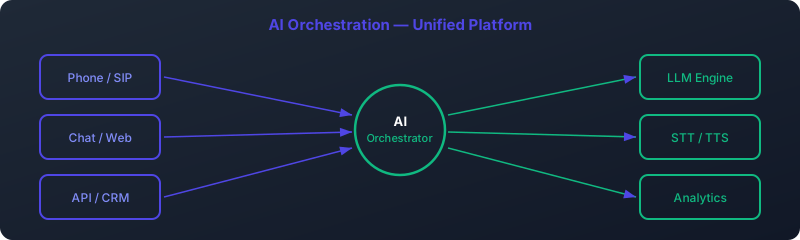
This conversion adds a tiny amount of latency but is essential for compatibility. Building this conversion logic into your AI orchestration layer ensures seamless communication between your cutting-edge TTS and legacy telephony systems.
Conclusion: The Power of a Self-Hosted TTS Engine
By following this guide, you have built more than just a text-to-speech script; you have deployed a production-grade, low-latency XTTS voice server. With first-chunk latency as low as 84ms, you can power truly interactive and natural-sounding AI voice agents, breaking free from the limitations and costs of cloud-based TTS APIs.
The combination of XTTS v2's expressiveness, the performance boost from DeepSpeed TTS optimization, and the real-time capabilities of a streaming architecture provides an unparalleled foundation for the next generation of voice-first applications.
Frequently Asked Questions (FAQ)
Can I run this XTTS v2 server on a CPU?
Technically, yes, by setting `model.to("cpu")` instead of `model.cuda()`. However, performance will be extremely slow (multiple seconds of latency for the first chunk), making it unsuitable for any real-time or interactive application. A GPU is strongly required for the performance described in this article.
What is the difference between the /tts and /tts_stream endpoints?
The `/tts` endpoint performs the full synthesis, saves the result to a file on the server, and then returns a confirmation. It's useful for batch jobs. The `/tts_stream` endpoint starts sending audio data back to the client as soon as the first chunk is generated, without waiting for the full sentence to be synthesized. This is essential for real-time applications like voicebots.
How do I create the best voice sample for cloning?
Use a high-quality microphone in a quiet room. Record 10-15 seconds of clear, expressive speech. Ensure there is no background noise, music, or echo. Save the file as a mono WAV. The more professional the recording, the better the cloned voice will be.
Why is DeepSpeed so important for an XTTS voice server?
DeepSpeed for Inference is a library from Microsoft that applies several advanced optimization techniques to AI models. For XTTS, it significantly reduces the computational overhead of the model's forward pass, which directly translates to lower latency. It is the key technology that enables the sub-100ms first-chunk performance.
Can I use languages other than English?
Absolutely. XTTS v2 is a multilingual model. You can specify the target language in your API call (e.g., `"language": "es"` for Spanish). You can even perform cross-language voice cloning, where you use an English voice sample to speak Spanish text in the same voice.
What does the `repetition_penalty` parameter do?
It's a mechanism to discourage the model from getting stuck in a loop and repeating the same sounds or words. A higher value (like the recommended 5.0) strongly penalizes repetition, leading to more fluent and varied speech, though setting it too high can sometimes cause other artifacts.
Is XTTS v2 free for commercial use?
XTTS v2 is released under the Coqui Public Model License 1.0.0. It is a permissive license that allows for commercial use. However, you should always read the full license text to understand its conditions and your obligations, especially regarding attribution and modifications.
How does this self-hosted server compare to cloud TTS services like Google or Azure?
A self-hosted XTTS TTS server offers several advantages: Cost: After the initial hardware investment, the operational cost is significantly lower than pay-per-character cloud APIs, especially at scale. Latency: By hosting it on your own infrastructure (or close to your application logic), you can often achieve lower network latency than a public cloud service. Privacy: All data remains within your control, which is critical for applications handling sensitive information. Customization: You have full control over the model, parameters, and can use custom-cloned voices without restriction. The main disadvantage is the need to manage the infrastructure yourself.
What is the purpose of the speaker embedding cache?
Computing the speaker embedding from a WAV file is a relatively slow process that involves running the audio through part of the neural network. By caching the result (the embedding vectors) in memory after the first computation, the server can instantly retrieve it for subsequent requests using the same speaker, significantly speeding up API response times for known voices.
How do I scale this server to handle high traffic?
Scaling a GPU-based inference server involves several strategies. You can use a load balancer (like Nginx) to distribute requests across multiple server instances running on different GPUs. For very high concurrency, you might explore tools like NVIDIA Triton Inference Server, which is designed for deploying AI models at scale, though this adds complexity to the setup.