Table of Contents
- Why Build an Ollama Voice Bot? The Case for Local LLMs in 2026
- Choosing Your Engine: Qwen 2.5 7B vs. Llama 3 8B for Voice
- Technical Setup Guide: Installing Your Ollama Voice Bot on Ubuntu
- Optimal Configuration for Real-Time Voice
- Interacting with Your Local LLM: The Ollama API and Python
- Prompt Engineering for Natural Phone Conversations
- Performance Tuning: Quantization and Monitoring
- Bringing it to Life: Integration with Asterisk EAGI
- Frequently Asked Questions (FAQ)
Why Build an Ollama Voice Bot? The Case for Local LLMs in 2026
- Unbreakable Privacy: When you run a self-hosted LLM telephony system, no sensitive customer conversation ever leaves your infrastructure. Transcripts, audio, and proprietary data remain under your complete control. This isn't just a feature; it's a critical requirement for industries like healthcare (HIPAA), finance, and legal services. You completely bypass the data privacy concerns associated with third-party APIs.
- Predictable, Low Costs: Cloud-based AI voice services charge per minute, per character, or per API call. These costs can be volatile and scale unpredictably. With a local setup, the cost is a fixed, one-time investment in hardware (or a predictable monthly server cost). After the initial setup, the marginal cost of handling one million calls is virtually zero, a stark contrast to the pay-as-you-go model.
- Minimal Latency: In a phone conversation, every millisecond counts. The round-trip time to a cloud API, processing, and return can introduce awkward, unnatural pauses. A local Ollama voice bot, running on the same network as your telephony stack (like Asterisk), can reduce this network latency to near zero. This enables faster, more fluid, and human-like interactions, which is the holy grail for any local LLM voice assistant.
Choosing Your Engine: Qwen 2.5 7B vs. Llama 3 8B for Voice
The choice of LLM is the most critical decision for your voice bot's performance. For real-time conversation, we need a model that is not only intelligent but, more importantly, *fast*. The goal is to minimize the "time to first token" (TTFT) and maximize the "tokens per second" (T/s) to avoid awkward silences. In 2026, two models stand out for this specific use case: Alibaba's Qwen 2.5 7B and Meta's Llama 3 8B. While Llama 3 is an exceptional all-rounder, Qwen 2.5 has been fine-tuned with a focus on speed and conversational flow, making it a prime candidate for a Qwen voice agent. Here's a breakdown based on running a 4-bit quantized version (`q4_K_M`) on an NVIDIA L4 GPU:| Metric | Qwen 2.5 7B (q4_K_M) | Llama 3 8B (q4_K_M) | Recommendation for Voice |
|---|---|---|---|
| Time to First Token (TTFT) | ~85 ms | ~110 ms | Qwen's lower TTFT means the bot starts "speaking" faster, feeling more responsive. |
| Tokens per Second (T/s) | ~120 T/s | ~95 T/s | Qwen generates the rest of the response faster, crucial for short, conversational replies. |
| VRAM Usage (kept alive) | ~5.1 GB | ~5.8 GB | Both are manageable on modern GPUs (like an L4 or 4060 Ti), but Qwen is slightly lighter. |
| Conversational Quality | Excellent, excels at short, direct answers. Strong multilingual support. | Exceptional, provides more detailed and nuanced responses. Can sometimes be too verbose for voice. | Qwen's natural brevity is an advantage for phone calls. Llama 3 may require more aggressive prompt engineering to keep responses concise. |
Technical Setup Guide: Installing Your Ollama Voice Bot on Ubuntu
Let's build our self-hosted LLM telephony engine. This guide assumes you're using Ubuntu 22.04 LTS and have a server with a compatible NVIDIA GPU.Prerequisites
- A server running Ubuntu 22.04 or later.
- An NVIDIA GPU with at least 8GB of VRAM (e.g., RTX 3060, RTX 4060, L4, A10).
- Root or sudo access.
- A stable internet connection for the initial download.
Step 1: Install NVIDIA Drivers and CUDA Toolkit
Ollama relies on the underlying NVIDIA drivers and CUDA toolkit to harness the power of your GPU.# First, update your system
sudo apt update && sudo apt upgrade -y
# Add the official NVIDIA CUDA repository
wget https://developer.download.nvidia.com/compute/cuda/repos/ubuntu2204/x86_64/cuda-keyring_1.1-1_all.deb
sudo dpkg -i cuda-keyring_1.1-1_all.deb
sudo apt-get update
# Install the CUDA toolkit and drivers
sudo apt-get -y install cuda-toolkit-12-4
# Verify the installation
nvidia-smiStep 2: Install Ollama
Ollama's one-line installation script makes this process incredibly simple.# Download and run the Ollama installation script
curl -fsSL https://ollama.com/install.sh | shStep 3: Pull and Run Your First Model
Now, let's download our chosen model, the quantized version of Qwen 2.5 7B.# Pull the qwen2:7b-instruct-q4_K_M model
ollama pull qwen2:7b-instruct-q4_K_M
# Once downloaded, run the model to test it
ollama run qwen2:7b-instruct-q4_K_M
>>> Hello, what is your purpose?Optimal Configuration for Real-Time Voice
The default Ollama configuration is good, but for a high-performance voice bot, we need to tune it. This is done by creating a custom "Modelfile" or by passing parameters via the API.Eliminating Cold Starts with `keep_alive`
By default, Ollama unloads a model from VRAM after 5 minutes of inactivity to free up resources. For a phone agent that needs to be instantly available, this is unacceptable. We can force the model to stay loaded in VRAM indefinitely. To do this via the API, set the `keep_alive` parameter in your API request body to `-1`. This ensures the model is always hot and ready, eliminating the "cold start" latency of loading it into memory for the first call after a period of inactivity.{
"model": "qwen2:7b-instruct-q4_K_M",
"prompt": "Hello!",
"stream": false,
"keep_alive": -1
}Controlling Responses with `max_tokens` and `temperature`
For voice, we need short, predictable responses.- `max_tokens` (or `num_predict` in Ollama): Limit the response length. A value around `80` is a good starting point. This prevents the LLM from rambling and forces it to be concise, which is perfect for a conversational turn.
- `temperature`:** Controls creativity. A value of `0.7` provides a good balance between deterministic, helpful answers and a more natural, less robotic conversational style. Avoid `0`, which can be repetitive, and values over `1.0`, which can lead to nonsensical responses.
Interacting with Your Local LLM: The Ollama API and Python
Ollama exposes a simple REST API on port `11434`. You can interact with your voice bot's brain from any programming language. Here’s how to do it with Python, which is perfect for integrating with a telephony platform like Asterisk. First, ensure you have the `requests` library installed: `pip install requests`.import requests
import json
# Ollama API endpoint
OLLAMA_ENDPOINT = "http://localhost:11434/api/generate"
# System prompt for our phone agent
SYSTEM_PROMPT = """
You are a helpful, friendly, and concise AI phone agent for 'AquaSparkle Pools'.
Your goal is to answer customer questions about pool maintenance.
- Keep your answers under 40 words.
- You are bilingual in English and French. Respond in the language of the user's question.
- Do not ask follow-up questions. Provide a direct answer.
"""
def get_llm_response(user_query: str) -> str:
"""
Gets a response from the local Ollama voice bot.
"""
full_prompt = f"{SYSTEM_PROMPT}\n\nUser: {user_query}\nAI:"
payload = {
"model": "qwen2:7b-instruct-q4_K_M",
"prompt": full_prompt,
"stream": False,
"keep_alive": -1, # Keep the model loaded in VRAM
"options": {
"num_predict": 80, # Max tokens
"temperature": 0.7
}
}
try:
response = requests.post(OLLAMA_ENDPOINT, data=json.dumps(payload), timeout=15)
response.raise_for_status()
response_data = response.json()
return response_data.get("response", "").strip()
except requests.exceptions.RequestException as e:
print(f"Error communicating with Ollama: {e}")
return "I'm sorry, I'm having trouble connecting to my brain right now."
# Example usage
if __name__ == "__main__":
question = "How often should I check my pool's pH level?"
answer = get_llm_response(question)
print(f"User Question: {question}")
print(f"AI Agent Answer: {answer}")
question_fr = "Bonjour, comment puis-je éviter les algues dans ma piscine?"
answer_fr = get_llm_response(question_fr)
print(f"\nUser Question: {question_fr}")
print(f"AI Agent Answer: {answer_fr}")
Prompt Engineering for Natural Phone Conversations
The quality of your Ollama voice bot depends heavily on your system prompt. The example above is a great start. Let's break down the key principles: 1. Define the Persona: "You are a helpful, friendly, and concise AI phone agent for 'AquaSparkle Pools'." This sets the tone and context. 2. State the Goal: "Your goal is to answer customer questions about pool maintenance." This focuses the LLM's task. 3. Impose Constraints (Very Important for Voice): * `Keep your answers under 40 words.` This is the most critical rule for preventing long, awkward monologues. * `Do not ask follow-up questions.` In many IVR scenarios, you want the LLM to answer and then wait for the next user input, not drive the conversation. 4. Define Capabilities: "You are bilingual in English and French. Respond in the language of the user's question." Modern models like Qwen are excellent at this. This carefully crafted prompt, combined with the API parameters, transforms a general-purpose LLM into a specialized Qwen voice agent.Performance Tuning: Quantization and Monitoring
To run efficiently, we need to optimize our model and keep an eye on resources.The Power of Quantization (q4_K_M)
Quantization is the process of reducing the precision of the model's weights, which dramatically shrinks its size and VRAM footprint, and often increases speed. We're using `q4_K_M`, a popular 4-bit quantization method.- `q4` means it's a 4-bit quantization.
- `_K` is a "K-quants" strategy, an improved method over older techniques.
- `_M` means it's the "medium" size variant, offering a great balance of performance and quality.
- Unquantized (FP16): ~14 GB VRAM
- Quantized (q4_K_M): ~5 GB VRAM
Monitoring VRAM Usage with `nvidia-smi`
While your bot is running, you need to monitor its resource consumption. The `nvidia-smi` command is your best friend.# Watch GPU usage in real-time
watch -n 1 nvidia-smiBringing it to Life: Integration with Asterisk EAGI
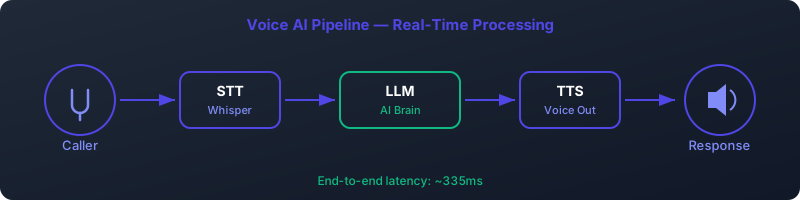
The final step is to connect your Python script to a telephony platform. Asterisk, the open-source PBX, is a perfect choice. Using the **Enhanced AGI (EAGI)** protocol, you can create a powerful interactive voice response (IVR) system. The workflow looks like this:- Incoming Call: A call arrives at your Asterisk server.
- Asterisk Dialplan: The dialplan executes an `AGI` script.
- Speech-to-Text (STT): The AGI script uses an STT engine (e.g., Vosk, Whisper) to capture the caller's audio and transcribe it to text.
- Call Ollama API: The transcribed text is passed to your Python script, which calls the local Ollama API (as shown in our example).
- Get LLM Response: The Ollama voice bot processes the text and returns a concise answer.
- Text-to-Speech (TTS): The Python script sends the LLM's text response to a TTS engine (e.g., Piper, Coqui AI) to generate audio.
- Stream Audio: The generated audio is streamed back to the caller via Asterisk.
Frequently Asked Questions (FAQ)
What is an Ollama voice bot?
An Ollama voice bot is a conversational AI system, typically used for phone calls or voice assistants, that uses the Ollama platform to run a Large Language Model (LLM) on local hardware. This approach prioritizes privacy, cost control, and low latency by avoiding reliance on cloud-based AI services.
Can I run this on a Raspberry Pi or a computer without a GPU?
While you can run Ollama and smaller models on a CPU or a Raspberry Pi, it is not recommended for real-time voice applications. The inference speed would be too slow, leading to long, unacceptable delays in conversation. A dedicated NVIDIA GPU with at least 8GB of VRAM is strongly recommended for a responsive local LLM voice assistant.
How does this compare to cloud services like Google Dialogflow or Amazon Lex?
Cloud services offer a managed, easier-to-set-up platform but come with per-use costs, potential data privacy issues, and higher network latency. An Ollama-based solution requires a higher initial technical investment but provides superior privacy, predictable costs (fixed hardware/server expenses), and the lowest possible latency for more natural conversations.
What are the best open-source STT and TTS engines to pair with this?
For a fully offline AI voice system, you'll need local STT/TTS. Great open-source options include:
- Speech-to-Text (STT): Vosk, Whisper (via whisper.cpp for CPU/GPU efficiency).
- Text-to-Speech (TTS): Piper (very fast, low resource), Coqui TTS (high quality, more complex).
How do I handle multiple concurrent calls?
Handling concurrent calls requires careful resource management. A single powerful GPU (like an L40S or A100) can handle multiple models or concurrent requests to the same model. Ollama's architecture is evolving to better support this. For high-volume scenarios, you might run multiple Ollama instances on different GPUs and use a load balancer to distribute requests from your Asterisk servers.
Why is Qwen 2.5 7B recommended over Llama 3 8B for voice?
While both are excellent, Qwen 2.5 7B has demonstrated a lower Time to First Token (TTFT) and higher tokens-per-second generation speed in many benchmarks. For voice, starting the response quickly and finishing it fast is more important than the slightly higher reasoning complexity Llama 3 might offer. Qwen's tendency towards more concise answers is also a natural fit for phone conversations.
Is it difficult to set up the Asterisk integration?
It requires familiarity with both Asterisk dialplans and scripting (like Python or Perl). The concept of using AGI is straightforward, but the implementation details—managing audio streams, calling external processes for STT/TTS/LLM, and handling errors—can be complex. However, the modularity of the approach allows you to build and test each component (STT, LLM, TTS) independently.
What are the real-world hardware costs?
As of 2026, a capable server with a GPU like an NVIDIA L4 or an RTX 4060 Ti can be purchased or rented for a reasonable price. A dedicated server with an L4 GPU might cost around $200-$400/month. A self-built machine with a consumer GPU could have an upfront cost of $1500-$2500. This is a fixed cost, which can be significantly cheaper than paying per-minute fees for thousands of call-minutes per month on a cloud platform.
How can I make my Qwen voice agent support more languages?
The Qwen model family has strong multilingual capabilities out of the box. The key is in your prompt. By instructing the model to "respond in the language of the user's question," you leverage its inherent ability to detect the input language and generate a response in the same one. Ensure your STT engine also supports the languages you wish to serve.
What does `keep_alive: -1` actually do?
The `keep_alive` parameter tells the Ollama server how long to keep a model loaded in the GPU's VRAM after it has finished processing a request. By default, it's 5 minutes. Setting it to `-1` tells Ollama to *never* unload the model. This dedicates the VRAM to that model but ensures that every single API call is a "hot" call, with zero time spent loading the model into memory, which is essential for a responsive self-hosted LLM telephony system.