In 2026, the frontier of customer interaction is no longer about pressing keys in an IVR menu; it's about having natural, intelligent conversations. Building an AI voice agent that can understand, think, and respond like a human is now more accessible than ever, thanks to powerful open-source telephony and self-hosted AI models. This guide will walk you through the complete process of building a production-grade, low-latency AI voice agent on your own hardware, giving you full control over your data, costs, and customer experience.
We will orchestrate a sophisticated stack featuring Asterisk 20, a high-performance Speech-to-Text (STT) engine, a powerful Large Language Model (LLM), and the proprietary, ultra-fast mixael-TTS for speech synthesis. By hosting everything on-premise, you bypass the recurring fees and data privacy concerns of cloud APIs, making it an ideal solution for businesses concerned with GDPR, HIPAA, or simply maintaining a competitive edge. The result is a voice agent that is not just smart, but remarkably responsive.
Key Performance Benchmarks (On-Premise GPU Server)
STT (Transcription): ~170ms average
LLM (80-token response): ~361ms average
TTS (Time to First Audio Chunk): ~84ms
Total Perceived Turnaround Latency: ~335ms
This is the time from when the caller finishes speaking to when they hear the first syllable of the AI's response. A sub-400ms latency is considered excellent in telephony and creates a fluid, natural conversational experience.
1. Architecture Overview
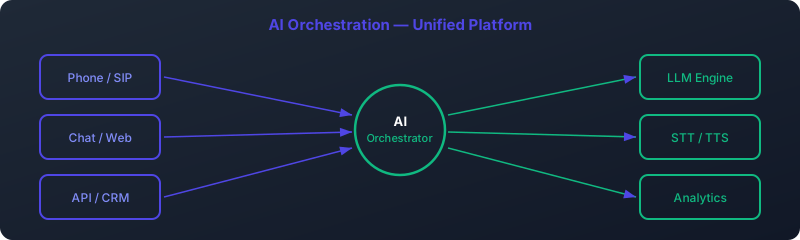
Before we dive into configuration files and code, it's crucial to understand the flow of data and logic in our system. Our AI voice agent is an orchestration of specialized microservices, each performing a critical task in the conversation pipeline. Asterisk, the heart of our telephony system, manages the call itself, while a Python script acts as the "brain," coordinating the AI services.
Here is the step-by-step journey of a single conversational turn:
- Call Arrival: A user dials a number connected to our Asterisk server. The call is routed via the PJSIP protocol.
- Dialplan Execution: Asterisk's dialplan (
extensions.conf) answers the call and immediately hands control over to our Python orchestration script using the Extended Asterisk Gateway Interface (EAGI). - Audio Streaming to Script: EAGI provides a special file descriptor (fd 3) through which Asterisk streams the caller's raw audio (8kHz, 16-bit mono PCM) directly to our Python script in real-time.
- Voice Activity Detection (VAD): The Python script continuously analyzes the incoming audio stream. It uses a VAD algorithm to differentiate between speech and silence, intelligently detecting when the caller has finished speaking.
- Speech-to-Text (STT): Once the VAD detects the end of an utterance, the script sends the collected audio chunk to our self-hosted STT engine via an HTTP POST request. The STT engine transcribes the audio and returns the text.
- Language Model (LLM) Inference: The script takes the transcribed text, appends it to the conversation history, and sends it to our self-hosted LLM backend. The LLM processes the context and generates a relevant, natural-sounding response.
- Text-to-Speech (TTS) Synthesis: The LLM's text response is immediately sent to the mixael-TTS server. We leverage its streaming capability, which begins returning audio data almost instantly, long before the full sentence is synthesized.
- Audio Playback & Barge-In: The Python script receives the streaming audio from mixael-TTS, saves it to a temporary file, and instructs Asterisk to play it back to the caller. Crucially, while the response is playing, the script continues to listen for the caller's voice. If the caller speaks over the agent (an action known as "barge-in"), the script can interrupt the playback and immediately begin processing the new input, creating a truly dynamic interaction.
This entire cycle repeats for each turn in the conversation, creating a seamless, back-and-forth dialogue.
2. Prerequisites
This is a production-grade setup that requires specific hardware and software. Ensure your environment meets these requirements before proceeding.
Hardware Requirements
- Server: A dedicated server or powerful workstation running Ubuntu 22.04 LTS.
- GPU: A modern NVIDIA RTX-class GPU (e.g., RTX 3090, RTX 4090, A6000) with at least 24GB of VRAM. The GPU is essential for achieving the low-latency performance of the STT and LLM services.
- CPU: A modern multi-core CPU (e.g., AMD EPYC, Intel Xeon) with 16+ cores.
- RAM: 64GB of RAM or more. Large language models can be memory-intensive.
- Storage: A fast NVMe SSD with at least 1TB of storage for the OS, AI models, and logs.
Software & Network Requirements
- Operating System: Ubuntu 22.04 LTS.
- Root/Sudo Access: You will need administrative privileges to install packages and configure services.
- AI Services: This guide assumes you have already installed and are running the following three services on the same server. The focus of this tutorial is the Asterisk orchestration layer.
- STT Engine: Listening on
http://127.0.0.1:6000with a/transcribeendpoint. - LLM Backend: An OpenAI-compatible API listening on
http://127.0.0.1:11434with a/api/chatendpoint. - mixael-TTS Server: Listening on
http://127.0.0.1:5002with a/tts_streamendpoint.
- STT Engine: Listening on
- Network Ports: Ensure your firewall allows traffic on the following ports:
- UDP 5060: For PJSIP (SIP signaling).
- UDP 10000-20000: For RTP (audio media). You must open this range on your server's firewall.
- TCP 6000, 11434, 5002: For the internal AI services. These should ideally be firewalled from external access and only accessible via the loopback interface (
127.0.0.1).
3. Install Asterisk 20 with PJSIP
Asterisk is the open-source communication engine that will manage our calls. We'll use Asterisk 20 for its modern features and stability, and PJSIP as the SIP channel driver for its superior performance and flexibility.
Step 1: Install Asterisk
First, update your package lists and install the necessary dependencies.
sudo apt update
sudo apt install -y wget build-essential linux-headers-`uname -r` libncurses5-dev libjansson-dev libxml2-dev libsqlite3-dev uuid-dev
For this guide, we'll install Asterisk directly from the official repositories provided by Digium/Sangoma. This ensures we get a stable, well-packaged version.
# Add the Asterisk repository
wget -O - http://packages.asterisk.org/keys/pgp.key | sudo apt-key add -
sudo sh -c 'echo "deb http://packages.asterisk.org/deb/ jammy main" > /etc/apt/sources.list.d/asterisk.list'

# Install Asterisk 20
sudo apt update
sudo apt install -y asterisk
After installation, start the Asterisk service and enable it to run on boot.
sudo systemctl start asterisk
sudo systemctl enable asterisk
Step 2: Configure a PJSIP Endpoint
Now, we need to configure Asterisk to accept SIP calls. We'll create a simple SIP account that a softphone (like Zoiper, Linphone, or a physical IP phone) can register to.
Edit the PJSIP configuration file, /etc/asterisk/pjsip.conf. You can clear the existing contents and replace them with the following configuration. Remember to replace YourStrongPassword with a secure password.
# /etc/asterisk/pjsip.conf

[global]
type=global
user_agent=AI Voice Agent v1.0
; Use your server's public or private IP address here
external_media_address=YOUR_SERVER_IP
external_signaling_address=YOUR_SERVER_IP

[transport-udp]
type=transport
protocol=udp
bind=0.0.0.0:5060

; --- Template for AI Agent Endpoints ---
[ai-agent-tpl](!)
type=endpoint
context=from-internal
disallow=all
allow=ulaw,alaw,slin16 ; slin16 is 8kHz 16-bit PCM, perfect for our AI
aors=ai-agent-aor
direct_media=no ; Force media through Asterisk so EAGI can access it

[ai-agent-auth-tpl](!)
type=auth
auth_type=userpass

; --- The Actual SIP Account ---
[100](ai-agent-tpl)
auth=auth100
aors=aor100

[auth100](ai-agent-auth-tpl)
username=100
password=YourStrongPassword

[aor100]
type=aor
max_contacts=1
Let's break this down:
- [transport-udp]: Tells Asterisk to listen for SIP connections on all network interfaces on UDP port 5060.
- [ai-agent-tpl]: A template for our endpoints. We explicitly allow
slin16(Signed Linear PCM at 8kHz), which is the raw format our AI pipeline will use, minimizing transcoding.direct_media=nois critical; it ensures the audio passes through Asterisk, making it available to our EAGI script. - [100]: This defines our actual SIP endpoint with the username "100". It uses the template for its base configuration.
- [auth100] and [aor100]: These sections define the authentication (username/password) and Address of Record (how Asterisk finds the endpoint) for account 100.
After saving the file, open the Asterisk CLI and reload the PJSIP module to apply the changes.
sudo asterisk -rvvv
pjsip reload
You can now configure your softphone to connect to your server's IP address with username 100 and the password you set. Once registered, you're ready to define the dialplan.
4. Asterisk Dialplan for the AI Agent
The dialplan, located in /etc/asterisk/extensions.conf, is the rulebook that tells Asterisk what to do with incoming calls. We will create an extension that, when dialed, executes our Python EAGI script.
Edit /etc/asterisk/extensions.conf and add the following context. You can place it below the existing [default] and [demo] contexts.
# /etc/asterisk/extensions.conf

[from-internal]
; This extension will be triggered when someone dials "888" from a registered phone.
exten => 888,1,NoOp(--- AI Voice Agent Call Started ---)
    same => n,Answer()
    same => n,NoOp(Handing call over to EAGI script...)
    ; Execute the EAGI script. Asterisk will look for it in /var/lib/asterisk/agi-bin/
    same => n,EAGI(voice_agent.py)
    same => n,NoOp(--- AI Voice Agent Call Ended ---)
    same => n,Hangup()
Here's what this simple dialplan does:
- [from-internal]: This is the context we assigned to our PJSIP endpoint
100. - exten => 888,1,NoOp(...): When a user dials
888, this is the first step.NoOpprints a message to the Asterisk console, which is great for debugging. - same => n,Answer(): Asterisk formally answers the call.
- same => n,EAGI(voice_agent.py): This is the most important line. It tells Asterisk to execute the
voice_agent.pyscript using the Extended AGI protocol. Asterisk will pause dialplan execution and give full call control to the script. The script must be located in Asterisk's agi-bin directory, typically/var/lib/asterisk/agi-bin/. - same => n,Hangup(): Once the EAGI script finishes and returns control, Asterisk will hang up the call.
Save the file and reload the dialplan from the Asterisk CLI:
dialplan reload5. The EAGI Python Orchestration Script
This script is the conductor of our AI orchestra. It will live in /var/lib/asterisk/agi-bin/ and must be executable. It will handle VAD, communicate with the three AI microservices, and manage the interaction with the caller.
First, create the file and install the necessary Python libraries.
sudo touch /var/lib/asterisk/agi-bin/voice_agent.py
sudo chmod +x /var/lib/asterisk/agi-bin/voice_agent.py
sudo apt install python3-pip
pip3 install requests webrtcvad
Now, let's write the script. Below is the complete, heavily commented Python code. Paste this into /var/lib/asterisk/agi-bin/voice_agent.py.
#!/usr/bin/env python3
# /var/lib/asterisk/agi-bin/voice_agent.py

import sys
import os
import requests
import webrtcvad
import time
import logging

# --- Configuration ---
# Logging setup
logging.basicConfig(filename='/var/log/asterisk/eagi_agent.log', level=logging.INFO,
                    format='%(asctime)s - %(levelname)s - %(message)s')

# API Endpoints
STT_API_URL = "http://127.0.0.1:6000/transcribe"
LLM_API_URL = "http://127.0.0.1:11434/api/chat"
TTS_API_URL = "http://127.0.0.1:5002/tts_stream"

# VAD Configuration
VAD_AGGRESSIVENESS = 3  # 0 to 3. 3 is most aggressive at filtering non-speech.
VAD_FRAME_MS = 20  # ms per frame
VAD_SAMPLE_RATE = 8000
VAD_BYTES_PER_FRAME = (VAD_SAMPLE_RATE * VAD_FRAME_MS // 1000