Table of Contents
- Why On-Premise is the Future for AI Voice Agents
- Guaranteed GDPR Compliance: Your Data, Your Servers
- The Unbeatable Economics of Self-Hosting
- Our Proven, Open-Source Architecture Revealed
- Performance Benchmarks: Real-Time Conversation is Here
- Hardware and Software Requirements
- Industries Benefiting from a Private AI Voice
- Get Started with Your On-Premise Agent
- Frequently Asked Questions
Why On-Premise is the Future for AI Voice Agents
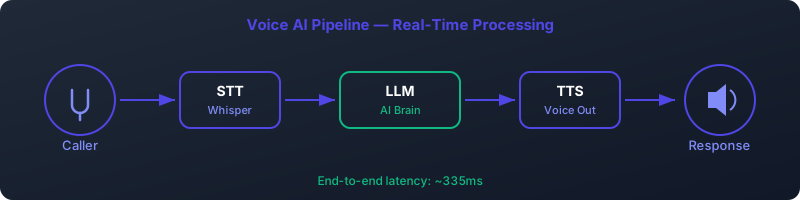
In the rush to adopt AI, businesses are increasingly deploying voice agents for customer service, reception, and internal workflows. The default choice has been cloud-based solutions from major tech providers. However, a powerful and superior alternative is emerging for businesses that prioritize privacy, cost-efficiency, and performance: the on-premise AI voice agent.
While cloud services offer convenience, they come with significant trade-offs. When you use a cloud AI voice API, you are sending your most sensitive customer conversations to a third-party server. This introduces critical vulnerabilities regarding data privacy, regulatory compliance (like GDPR), unpredictable costs, and frustrating latency. A self-hosted AI receptionist running on your own hardware eliminates these problems entirely.
Let's break down the four pillars where an on-premise solution fundamentally outperforms the cloud:
- Unmatched Privacy & Security: With an on-premise model, customer audio and conversation data never leave your infrastructure. This is not a "regional setting" in a cloud dashboard; it's a physical and digital reality. You have absolute control over your data, making it the gold standard for a private AI voice.
- Drastic Cost Reduction: Cloud AI voice services operate on a pay-per-minute model that becomes prohibitively expensive at scale. A self-hosted solution replaces these recurring operational expenditures (OpEx) with a one-time capital expenditure (CapEx) for hardware, reducing the per-minute cost to near-zero—just the cost of electricity.
- Ultra-Low Latency: The speed of light is a real constraint. Sending audio to a distant cloud server, waiting for it to be processed, and receiving the response back inevitably adds delay. A local AI phone system processes everything on-site, resulting in a natural, real-time conversational flow that is impossible for the cloud to consistently match.
- Total Control & Customization: You are not locked into a specific provider's models, voice options, or integration capabilities. With an on-premise stack, you can choose the best open-source models (LLM, ASR, TTS), fine-tune them on your own data, and integrate them deeply with any internal system, from your CRM to legacy databases.
Guaranteed GDPR Compliance: Your Data, Your Servers
For any organization operating in or serving the EU, the General Data Protection Regulation (GDPR) is non-negotiable. Voice conversations often contain Personally Identifiable Information (PII), making them a high-risk data category. A GDPR AI voice agent is not just a feature; it's a legal and ethical necessity.
Cloud providers often claim GDPR compliance, but the reality is complex. They may store primary data in EU data centers, but what about metadata, logs, or analytics data? Can you be 100% certain that no part of your data is processed by services or personnel outside the EU? The answer is often no.
The On-Premise GDPR Advantage
An on-premise AI voice agent is the only architecture that provides absolute, verifiable GDPR compliance. By processing and storing all call data—from the raw audio stream to the transcribed text and LLM prompts—entirely within your own physical servers located in your chosen jurisdiction, you eliminate any ambiguity. Data sovereignty is not a promise; it's a physical guarantee.
This is particularly critical for industries handling sensitive information. A law firm cannot risk client conversations being processed by a third party. A hospital cannot afford for patient data to be exposed. A bank must ensure financial details remain completely confidential. For these sectors, a self-hosted AI receptionist is the only responsible choice.
The Unbeatable Economics of Self-Hosting
The pricing model of cloud-based AI voice services is designed for high margins, not your bottom line. A typical rate of $0.20 per minute seems small, but it adds up astronomically at scale. Let's compare the costs for a business handling a moderate call volume of 10,000 calls per month, with an average call duration of 2 minutes.
| Metric | Cloud AI Voice Provider | On-Premise AI Voice Agent |
|---|---|---|
| Total Minutes / Month | 20,000 (10,000 calls * 2 min) | 20,000 (10,000 calls * 2 min) |
| Cost Per Minute | ~$0.20 | ~$0.003 (electricity cost) |
| Monthly Cost | $4,000 | ~$60 |
| Annual Cost | $48,000 | ~$720 (plus initial hardware) |
| Initial Cost | $0 | ~$5,000 - $8,000 (for a GPU server) |
| Break-Even Point | N/A | ~2 months |
As the table clearly shows, the recurring monthly fees for a cloud solution quickly dwarf the one-time hardware investment for an on-premise system. For a business with this call volume, the on-premise AI voice agent pays for itself in just two months. After that, the savings are massive and continuous. The cost per minute on-premise is calculated based on the power consumption of a high-end GPU server, making it a tiny fraction of the cloud alternative.
Our Proven, Open-Source Architecture Revealed
Building a high-performance local AI phone system requires orchestrating several cutting-edge open-source technologies. We have developed and benchmarked a robust stack that delivers exceptional quality and speed. The architecture is modular, allowing for easy upgrades and customization.
Here’s how a call flows through our system:
- Telephony (Asterisk): An incoming SIP call is received by Asterisk, the world's most popular open-source PBX. Asterisk manages the call state and audio streams.
- Orchestration (AGI Script): An Asterisk Gateway Interface (AGI) script, typically written in Python, acts as the brain. It takes the audio from Asterisk and routes it to the other services.
- Speech-to-Text (STT engine): The live audio stream is sent to a local STT engine server. STT engine is a highly optimized implementation of OpenAI's Whisper model, providing incredibly fast and accurate transcription.
- Language Model (LLM backend): The transcribed text is sent to a Large Language Model (LLM) running via LLM backend. LLM backend simplifies running powerful models like LLM locally. The LLM processes the user's request and generates a text response.
- Text-to-Speech (mixael-TTS): The LLM's text response is sent to a Coqui mixael-TTS server. This state-of-the-art TTS engine generates natural, human-like speech with very low latency. It can even be fine-tuned on a voice for a custom-branded assistant.
- Response to User: The generated audio file is streamed back through the AGI script to Asterisk, which plays it to the caller. This entire loop happens in a fraction of a second.
The Stack Components
- PBX: Asterisk - Handles SIP/PSTN connectivity.
- ASR: STT engine - For real-time, accurate speech-to-text.
- LLM Runner: LLM backend - To serve and manage local LLMs.
- LLM: LLM1.5-7B-Chat - A powerful and fast conversational model.
- TTS: mixael-TTS - For high-quality, low-latency text-to-speech.
This architecture is designed for scalability. A single, well-equipped server can handle dozens of concurrent calls, as the GPU can process multiple inference requests in parallel. The entire system can be containerized with Docker for easy deployment and management.
Performance Benchmarks: Real-Time Conversation is Here
The single most important metric for a voice agent's user experience is latency. High latency leads to awkward pauses and a frustrating, unnatural conversation. Our goal was to achieve a "perceived latency"—the time from the moment a user stops speaking to the moment the AI starts responding—of under 500ms. With our optimized stack on modern hardware, we have shattered that goal.
These benchmarks were recorded on a server with an NVIDIA RTX 4090 GPU. The 335ms total perceived latency is a game-changer. It's faster than a typical human-to-human response time, creating a seamless and fluid conversational experience.
| Component | Model/Implementation | Average Latency (on RTX 4090) | Notes |
|---|---|---|---|
| ASR (Speech-to-Text) | STT engine (small.en) with Silero VAD | ~100ms after end of speech | Voice Activity Detection (VAD) is crucial for instantly detecting when the user has finished speaking. |
| LLM (Inference) | LLM backend1.5-7B-Chat (4-bit quant) | ~150ms (Time to First Token) | This is the time it takes for the LLM to generate the first word of its response. The rest streams in parallel. |
| TTS (Text-to-Speech) | mixael-TTS | ~85ms (Time to First Audio Chunk) | Streaming TTS is key. We don't wait for the full sentence; we start playing audio as soon as the first chunk is ready. |
| Network & Orchestration | Localhost | <5ms | Negligible overhead when all services run on the same machine. |
| Total Perceived Latency | End-to-End | ~335ms | Achieves a truly real-time conversational flow. |
Hardware and Software Requirements
To achieve this level of performance, a dedicated server with a powerful GPU is essential. While the initial investment is not trivial, it is quickly offset by the elimination of cloud fees.
Hardware
- GPU: An NVIDIA GPU with at least 24GB of VRAM is highly recommended. NVIDIA RTX 3090, RTX 4090, or professional-grade cards like the A100/H100 are ideal. The GPU is the bottleneck for AI model inference.
- RAM: 32GB of system RAM is a minimum. 64GB or more is recommended for handling many concurrent calls and larger models.
- CPU: A modern multi-core CPU (e.g., AMD Ryzen 9 or Intel Core i9) to handle system operations and data pipelines.
- Storage: A fast NVMe SSD (1TB or more) for the OS and to quickly load AI models.
Software
- Operating System: Ubuntu 22.04 LTS is the recommended and best-supported platform.
- NVIDIA Drivers: The latest NVIDIA drivers for your GPU.
- CUDA Toolkit: CUDA 12.1 or newer is required for the AI frameworks.
- Containerization: Docker and Docker Compose are strongly recommended for simplifying the deployment and management of the various services.
Industries Benefiting from a Private AI Voice
While any business can benefit from the cost savings and performance of an on-premise AI voice agent, certain sectors with high data sensitivity find it indispensable.
- Healthcare: Protects sensitive Patient Health Information (PHI), ensuring HIPAA and GDPR compliance. An on-premise agent can handle appointment scheduling, pre-visit screenings, and prescription refill reminders without ever exposing patient data to a third party.
- Legal: Maintains absolute client-attorney privilege. A self-hosted AI receptionist can handle new client intake, schedule consultations, and provide case status updates, with all information remaining securely within the firm's firewalls.
- Finance & Banking: Secures confidential financial data. Use cases include automated fraud alert verification, balance inquiries, and transaction authorizations, all processed on a secure, auditable local AI phone system.
- Government & Public Sector: Guarantees data sovereignty by keeping citizen data within national borders. This is crucial for compliance with local data residency laws.
Get Started with Your On-Premise Agent
The power of a private, low-latency, and cost-effective AI voice agent is within your reach. You don't have to be locked into expensive and insecure cloud platforms. By leveraging the power of open-source software and modern hardware, you can build a system that is superior in every key metric.
Ready to Build?
Follow our comprehensive, step-by-step guide to set up your own on-premise AI voice agent using Asterisk, LLM backend, and our proven stack.
View the Setup GuideFrequently Asked Questions
1. Is an NVIDIA RTX 4090 really necessary?
For the ultra-low latency benchmarks (like 335ms) and handling multiple concurrent calls, a high-end GPU like the RTX 4090 or 3090 (with 24GB VRAM) is highly recommended. However, the system can run on less powerful GPUs (e.g., RTX 3060 12GB) for development or low-call-volume scenarios, but you should expect higher latency. The GPU is the single most important factor for performance.
2. How many concurrent calls can one server handle?
This depends heavily on the GPU. An RTX 4090 can comfortably handle 10-15 concurrent calls with the specified models while maintaining low latency. More powerful enterprise cards like an H100 can handle significantly more. The architecture is designed to batch inference requests, so it scales well with GPU power. CPU and RAM also play a role, but VRAM and GPU compute are the primary limiting factors.
3. Can I use a different LLM or TTS model?
Absolutely. That's a major benefit of this on-premise architecture. LLM backend supports a wide range of open-source models (like Llama 3, Mistral, etc.). You can easily swap LLM for another model by changing a single line in your configuration. Similarly, the TTS component is modular, so you could integrate other engines like Piper if you prefer.
4. How difficult is the initial setup?
The setup requires intermediate to advanced technical skills, particularly with Linux, Docker, and basic networking. It's not a "one-click install." However, our detailed setup guide (linked above) walks you through every step, from installing drivers to configuring Asterisk and launching the AI services with Docker Compose. With the guide, a competent sysadmin or developer should be able to get a basic system running in a day.
5. What is Asterisk and why is it used?
Asterisk is a powerful, open-source framework for building communications applications. In this context, it acts as a Private Branch Exchange (PBX), handling the phone call itself. It connects to the Public Switched Telephone Network (PSTN) via a SIP trunk, manages the call, and provides the audio stream to our AI orchestration script. It's the essential bridge between the telephone world and our AI services.
6. How does this solution handle voice cloning for a custom brand voice?
The Coqui mixael-TTS model has excellent zero-shot voice cloning capabilities. To create a custom brand voice, you only need a high-quality audio sample (as short as 30 seconds) of the desired voice. You provide this sample to the TTS server at runtime, and it will generate all responses in that voice. This allows for creating a unique and consistent voice identity for your private AI voice agent.
7. Can the AI agent integrate with my company's CRM or database?
Yes, and this is another major strength of the on-premise approach. The central orchestration script (the AGI script) can be customized to include API calls to any internal system. For example, after identifying a customer, the script can query your CRM for their order history, look up information in a local database, or trigger an action in another internal application. This allows for deeply integrated and highly functional workflows that are impossible with siloed cloud solutions.
8. What are the ongoing maintenance requirements?
Ongoing maintenance involves standard server administration: applying security patches to the OS (Ubuntu), monitoring system resources (CPU, GPU, RAM), and managing logs. You may also choose to periodically update the AI models (e.g., to a new version of LLM or mixael-TTS) to benefit from the latest improvements in quality and performance. Using Docker simplifies these updates significantly.
9. Is a GDPR AI voice agent relevant for businesses outside the EU?
Yes. Even if you're not bound by GDPR, the principles of data privacy and security are universal. Regulations similar to GDPR, like the California Consumer Privacy Act (CCPA), are becoming common worldwide. More importantly, customers everywhere are growing more concerned about how their data is used. Offering a truly private AI voice service that guarantees data confidentiality is a powerful competitive differentiator and builds customer trust, regardless of your location.
10. Are there any hidden costs besides hardware and electricity?
The primary costs are the upfront hardware and the ongoing electricity. The software stack we've outlined is entirely open-source and free to use for commercial purposes. The only other potential cost is the SIP trunking service, which you need to connect your system to the public telephone network. These services are highly competitive and typically have a very low per-minute or per-channel cost, which is separate from the AI processing cost.