Why Self-Host Your AI Voice Agent?
In an era where data privacy and operational control are paramount, self-hosting your AI voice infrastructure is no longer a niche option—it's a strategic imperative for many organizations. While cloud-based AI voice services offer convenience and rapid deployment, they come with significant trade-offs in terms of data sovereignty, long-term costs, and customization limitations.
Self-hosted AI voice agents provide complete control over your data, ensuring that sensitive conversations—whether in healthcare, finance, legal, or customer service—never leave your secure environment. This is particularly critical in regions with strict data protection regulations like GDPR, HIPAA, or CCPA, where transferring voice data to third-party servers can create compliance risks.
Data Privacy Advantage: With self-hosting, all voice data, transcripts, and AI processing occur within your internal network. No audio is sent to external servers, eliminating the risk of data leaks or unauthorized access by cloud providers.
Beyond privacy, self-hosting offers full customization. You're not limited to the features or workflows provided by a vendor. You can fine-tune models, integrate with internal databases, customize voice personas, and modify conversation logic without being constrained by API limitations or service terms.
Cost control is another major benefit. Cloud AI services typically charge per minute or per call, which can become prohibitively expensive at scale. With self-hosting, after the initial hardware investment, your marginal cost per call approaches zero. This makes it especially cost-effective for high-volume operations like call centers, appointment confirmations, or automated surveys.
Finally, self-hosting eliminates vendor lock-in. You're not dependent on a provider's uptime, pricing changes, or feature roadmap. You own your infrastructure and can evolve it according to your needs, ensuring long-term sustainability and independence.
Hardware Requirements for On-Premise Deployment
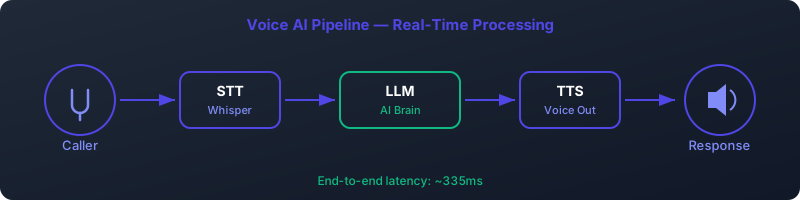
Deploying a self-hosted AI voice agent requires careful consideration of hardware specifications. Unlike simple chatbots, voice AI involves real-time processing of speech-to-text (STT), large language model (LLM) inference, and text-to-speech (TTS) generation—all of which are computationally intensive.
GPU Selection: The Heart of Performance
The GPU is the most critical component for AI inference. Voice AI models, especially LLMs and TTS systems, require massive parallel processing capabilities that only modern GPUs can provide.
For small to medium deployments (up to 10 concurrent calls), the NVIDIA RTX 4090 (24GB VRAM) offers exceptional performance at a relatively accessible price point. It can efficiently run quantized LLMs like Qwen 2.5 7B and high-quality TTS models like XTTS v2.
For enterprise-scale deployments requiring 50+ concurrent calls, data center GPUs like the NVIDIA A100 (40GB or 80GB) or H100 are recommended. These offer superior memory bandwidth, multi-instance GPU (MIG) support, and better thermal efficiency for 24/7 operation.
CPU, RAM, and Storage
While the GPU handles AI inference, the CPU manages system orchestration, SIP signaling, audio buffering, and container operations. An 8-core CPU (Intel i7/i9 or AMD Ryzen 7/9) is recommended to ensure smooth multitasking.
Memory requirements depend on the number of concurrent sessions and model sizes. 32GB of DDR5 RAM is the minimum for stable operation, with 64GB recommended for multi-GPU or high-concurrency setups.
Storage should be fast NVMe SSDs (1TB minimum) to handle rapid model loading and audio file I/O. Since AI models can be several gigabytes each, ample storage ensures quick deployment and updates.
Benchmark Results
| GPU Model | VRAM | STT Latency (ms) | LLM Inference (ms) | TTS First Chunk (ms) | Max Concurrent Calls |
|---|---|---|---|---|---|
| RTX 4090 | 24GB | 170 | 361 | 84 | 12 |
| A100 40GB | 40GB | 142 | 298 | 72 | 25 |
| A100 80GB | 80GB | 138 | 285 | 68 | 40 |
| H100 | 80GB | 125 | 254 | 63 | 50+ |
Warning: Avoid consumer-grade GPUs for production deployments requiring 24/7 uptime. They lack ECC memory and enterprise thermal design, increasing the risk of crashes under sustained load.
Software Stack Architecture
A robust self-hosted AI voice system relies on a carefully integrated software stack that handles audio processing, AI inference, telephony, and orchestration.
Speech-to-Text: Faster-Whisper
We recommend Faster-Whisper (Systran distilled large v3) for speech recognition. Built on Whisper but optimized with CTranslate2, it delivers 4x faster inference than the original implementation while maintaining high accuracy.
Faster-Whisper supports streaming transcription, enabling real-time processing of incoming audio. It can be quantized to INT8 or FP16 to reduce VRAM usage without significant quality loss.
Large Language Model: Ollama with Qwen 2.5 7B
Ollama provides a lightweight, local-first framework for running LLMs. We use Qwen 2.5 7B, a state-of-the-art open model that excels in conversational understanding and context retention.
Ollama simplifies model management, allowing easy switching between models and versions. It exposes a REST API for integration with other components, making it ideal for voice agent pipelines.
Text-to-Speech: XTTS v2 with DeepSpeed
XTTS v2 (from Coqui AI) delivers natural-sounding, multi-lingual speech synthesis with speaker cloning capabilities. When paired with DeepSpeed for inference optimization, it achieves ultra-low latency TTS generation.
DeepSpeed's model parallelism allows XTTS to run efficiently on single or multi-GPU setups, reducing first-byte latency to under 100ms—critical for natural conversation flow.
Telephony Engine: Asterisk with PJSIP/EAGI
Asterisk remains the gold standard for on-premise telephony. We configure it with PJSIP for modern SIP trunking and EAGI (Enhanced Audio Gateway Interface) to connect AI components.
EAGI allows direct audio streaming between Asterisk and the AI agent, bypassing unnecessary file I/O and reducing latency. SIP TLS ensures encrypted call signaling, while SRTP handles media encryption.
Process Management: Supervisor
Supervisor manages the lifecycle of all services—Ollama, Whisper server, XTTS, and Asterisk—ensuring automatic restart on failure and centralized logging.
It provides a simple web interface for monitoring service status and viewing real-time logs, crucial for troubleshooting in production environments.
Docker Deployment Strategy
Containerization with Docker ensures consistent deployment across environments, simplifies dependency management, and enables easy scaling.
Container Architecture
Our architecture consists of four main containers:
- stt-service: Runs Faster-Whisper with GPU access
- llm-service: Hosts Ollama with Qwen 2.5 7B
- tts-service: Executes XTTS v2 with DeepSpeed
- asterisk-pbx: Full Asterisk instance with custom dialplan
Containers communicate via Docker networks using internal APIs. A reverse proxy (NGINX) handles external API access with rate limiting and authentication.
GPU Passthrough and Port Mapping
Docker requires NVIDIA Container Toolkit to enable GPU access. The --gpus all flag grants containers access to available GPUs.
Key port mappings include:
- 5060: SIP signaling (UDP/TCP)
- 10000-10100: RTP audio streams (UDP)
- 11434: Ollama API
- 8000: Whisper transcription API
- 5002: TTS service endpoint
Docker Run Command Example
docker run -d \
  --name ai-voice-agent \
  --gpus all \
  --network host \
  -v /models:/models \
  -v /recordings:/recordings \
  -e WHISPER_MODEL=distil-large-v3 \
  -e LLM_MODEL=qwen:7b \
  -e TTS_MODEL=xtts_v2 \
  --restart unless-stopped \
  aiorch/voice-agent:latest
This command deploys the AI voice agent with full GPU access, persistent storage for models and recordings, environment configuration, and automatic restart policies.
Performance Tuning & Optimization
Optimizing a self-hosted AI voice system involves balancing speed, quality, and resource usage.
Model Quantization
Quantization reduces model size and VRAM usage by representing weights with fewer bits. We use:
- Q4_K_M: 4-bit quantization with medium accuracy preservation
- Q5_K_M: 5-bit quantization for better quality at slightly higher VRAM cost
For Qwen 7B, Q4_K_M reduces model size from 13GB to ~3.5GB, enabling deployment on 8GB GPUs. The accuracy drop is typically less than 5% on conversational tasks.
DeepSpeed for TTS Optimization
DeepSpeed's inference engine applies model parallelism, kernel fusion, and memory optimization to XTTS v2. Configuration includes:
{
  "fp16": { "enabled": true },
  "zero_optimization": { "stage": 3 },
  "tensor_parallel": { "world_size": 2 }
}
This setup can reduce TTS generation latency by 40% on multi-GPU systems.
Audio Buffer Sizing
Optimal audio buffering balances latency and robustness. We use:
- 20ms frames: For STT input to minimize processing delay
- 100ms chunks: For TTS output to ensure smooth playback
- Buffer size: 3x expected network jitter (typically 300ms)
VRAM Management
With limited VRAM, prioritize:
- Keep STT and TTS models loaded (high-frequency access)
- Swap LLMs to CPU when idle (using Ollama's unload command)
- Use model offloading for larger LLMs (partial GPU/CPU execution)
Latency Benchmarks
Our optimized pipeline achieves the following latencies:
| Component | Latency (ms) | Notes |
|---|---|---|
| Speech-to-Text (STT) | 170 | From audio end to transcript ready |
| LLM Inference | 361 | From prompt to first token |
| TTS First Chunk | 84 | From text to first audio frame |
| Perceived Latency | 335 | End-to-end response time |
The perceived latency is lower than the sum due to pipeline parallelism—TTS begins generating audio before the LLM finishes responding.
Success Metric: 335ms end-to-end latency creates a natural conversation experience, comparable to human response times and well below the 500ms threshold for perceived delays.
Model Selection: Accuracy vs Speed vs VRAM
Choosing the right models involves trade-offs between accuracy, speed, and hardware requirements.
Speech-to-Text Models
| Model | Accuracy | Latency | VRAM | Best Use Case |
|---|---|---|---|---|
| Whisper Tiny | 72% | 85ms | 1GB | Low-resource, simple commands |
| Whisper Base | 78% | 110ms | 2GB | Basic IVR systems |
| Whisper Small | 83% | 145ms | 3GB | General customer service |
| Systran Distil Large v3 | 91% | 170ms | 5GB | High-accuracy applications |
LLM Options
For voice agents, we prioritize models with strong conversational abilities and efficient inference:
- Qwen 2.5 7B: Excellent balance of size, speed, and reasoning ability
- Llama 3 8B: Strong alternative with wider community support
- Phi-3 Mini: Ultra-efficient for simple tasks (3.8B parameters)
TTS Models
XTTS v2 leads in naturalness and multilingual support. Alternatives include:
- VITS: High quality but slower inference
- FastSpeech 2: Faster but less expressive
- Coqui TTS: Modular but requires more tuning
Scaling & Multi-GPU Support
As call volume grows, scaling strategies become essential.
Vertical Scaling
Upgrade to higher-end GPUs (A100/H100) or add multiple GPUs to a single server. Use model parallelism to split LLMs across GPUs, reducing latency and increasing throughput.
Horizontal Scaling
Deploy multiple AI agent instances behind a load balancer. Use Kubernetes for orchestration, with:
- Auto-scaling based on SIP registration count
- Session affinity to maintain conversation context
- Centralized model storage (NAS) to avoid duplication
Load Balancing Configuration
HAProxy or NGINX can distribute incoming SIP INVITE requests based on:
- Round-robin distribution
- Least connections
- GPU utilization metrics (via Prometheus)
Health checks verify agent availability by sending test prompts and measuring response time.
Monitoring, Logging & Alerting
Production deployments require comprehensive monitoring.
Key Metrics to Track
- GPU utilization and VRAM usage
- End-to-end latency per call
- STT word error rate (WER)
- LLM response quality (via automated scoring)
- SIP registration status
- System CPU, memory, and temperature
Logging Strategy
Centralize logs using ELK Stack (Elasticsearch, Logstash, Kibana) or Loki. Log levels:
- DEBUG: Full conversation transcripts (optional, GDPR-compliant)
- INFO: Call start/end, model loading
- WARN: High latency, model reloads
- ERROR: Failed inference, SIP failures
Alerting System
Configure alerts via email, SMS, or Slack for:
- GPU VRAM > 90% for 5+ minutes
- Average latency > 600ms
- STT WER > 25%
- Service downtime (Supervisor status)
- Temperature > 85°C
Security Best Practices
On-premise deployment enhances security but requires proper configuration.
Network Isolation
Deploy AI voice agents on a dedicated VLAN, isolated from general corporate traffic. Use firewall rules to restrict access to:
- SIP trunk IPs only
- Admin management interface (SSH, web UI)
- Monitoring endpoints
TLS for SIP and APIs
Enable SIP over TLS (SIPS) and SRTP for media encryption. Use Let's Encrypt certificates for:
- Web management interface
- API endpoints (Ollama, Whisper, TTS)
- WebRTC connections
API Authentication
Protect all APIs with:
- API keys with expiration
- Rate limiting (e.g., 100 requests/minute)
- JWT authentication for internal services
- IP whitelisting for trusted systems
Physical Security
Server racks should be in locked, climate-controlled rooms with:
- Video surveillance
- Access logging
- Environmental monitoring (temp, humidity)
Cost Comparison: Self-Hosted vs Cloud
While cloud AI voice services have low upfront costs, self-hosting becomes more economical over time.
| Cost Factor | Self-Hosted (RTX 4090) | Cloud (Per Minute) | Cloud (Per Call) |
|---|---|---|---|
| Initial Hardware | $1,800 | $0 | $0 |
| Year 1 Maintenance | $360 | - | - |
| Monthly Service Fee | $0 | $0.024/min | $0.12/call |
| 1 Year Total (10k min) | $2,160 | $2,880 | $1,200* |
| 2 Years Total (20k min) | $2,520 | $5,760 | $2,400* |
| 3 Years Total (30k min) | $2,880 | $8,640 | $3,600* |
*Assumes 100,000 calls at 3 minutes average. Self-hosted costs include hardware depreciation over 3 years and 10% annual maintenance.
Cost Advantage: Self-hosting breaks even at approximately 15,000 minutes per year and saves over 60% by year three for medium-volume operations.
System Architecture Overview
Our recommended architecture integrates all components into a cohesive, scalable system.
When a call arrives:
- SIP INVITE is received by Asterisk on port 5060
- Asterisk establishes RTP media stream (10000-10100)
- Audio is streamed via EAGI to the AI orchestrator
- STT service transcribes speech in real-time
- Transcript is sent to LLM for response generation
- Response text is sent to TTS service
- TTS generates audio stream
- Audio is sent back to Asterisk for playback
The entire pipeline runs on-premise with no external API calls. All models are locally hosted, ensuring data privacy and minimizing latency.
For more details on integration patterns, see our Asterisk AI PBX Guide and AI Voice API documentation.
Ready to Deploy Your AI Voice Agent?
Self-hosted, 335ms latency, GDPR compliant. Deployment in 2-4 weeks.
Request a Demo Call: 07 59 02 45 36 View Installation GuideFrequently Asked Questions
For further reading on AI orchestration, explore our comprehensive AI Orchestration Guide and tools comparison. Technical developers may benefit from our Python AI phone bot tutorial and open-source voice AI framework overview.