Table of Contents
- The AI Voice API Landscape in 2026: Managed vs. Self-Hosted
- When to Use a Managed Voice AI API: Speed and Simplicity
- When to Build Your Own AI Voice API: Scale, Control, and Privacy
- Blueprint for a Self-Hosted AI Phone Call API
- Code Example: A Python EAGI Orchestration Script
- Taming Latency: The Key to Natural Conversation
- The Economics of Scale: Managed vs. Self-Hosted
- Frequently Asked Questions
The world of telephony has been irrevocably altered by conversational AI. For developers in the USA and UK, the question is no longer if you should integrate intelligent voice agents, but how. As we look towards 2026, the market has bifurcated into two distinct paths: leveraging powerful, managed AI voice APIs for speed, or building a custom, self-hosted solution for ultimate control and cost-efficiency.
This definitive guide is for developers and engineering leaders standing at that crossroads. We'll dissect the pros and cons of each approach, provide a complete architectural blueprint for a self-hosted AI voice API, and offer a clear framework for making the right strategic decision for your project.
The AI Voice API Landscape in 2026: Managed vs. Self-Hosted
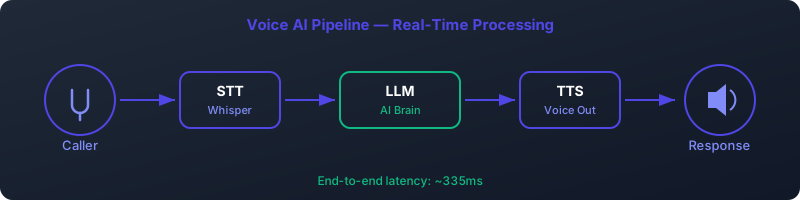
The choice between a managed service and a self-built stack is the most critical one you'll make. One path prioritizes time-to-market and ease of use, while the other prioritizes long-term scalability, customization, and cost. Let's break down the current state of play.
The Managed API Ecosystem: Plug-and-Play Power
Managed AI telephony APIs offer a fast track to deploying conversational AI. These platforms bundle STT, LLM, and TTS services with sophisticated telephony integration, latency optimization, and call management features into a single, per-minute pricing model. They are the dominant choice for startups and teams looking to validate an idea quickly.
Here’s a look at the leading players in the US/UK market as of 2026:
| Provider | Starting Price (per minute) | Key Features | Best For |
|---|---|---|---|
| Vapi | $0.05+ | Developer-first, highly extensible, serverless functions, low-latency. | Rapid prototyping, complex agent logic. |
| Retell AI | $0.07+ | Focus on ultra-low latency, custom voice cloning, enterprise-grade reliability. | Performance-critical applications. |
| Bland AI | $0.09+ | Simple API, fast onboarding, outbound calling campaigns. | High-volume outbound tasks. |
| ElevenLabs Conversational | $0.12+ | Best-in-class voice quality, emotional expressiveness, multilingual support. | Brand-focused, emotionally resonant agents. |
The "Build Your Own" (BYO) Revolution: The Open-Source Stack
The alternative path is to build your own AI phone call API using a curated stack of open-source technologies. This approach gives you complete control over every component, from the telephony engine to the specific AI models used. While it requires more initial setup and DevOps expertise, the long-term benefits in cost, customization, and data privacy are immense.
Our recommended open-source stack for a robust, scalable voice AI developer API includes:
- Telephony Engine: Asterisk (the industry-standard open-source PBX)
- Orchestration Layer: A Python Flask REST API to manage the AI pipeline
- Speech-to-Text (STT): OpenAI's Whisper (via a self-hosted inference server)
- Language Model (LLM): LLM backend for serving local models like Llama 3 or Mistral
- Text-to-Speech (TTS): Coqui mixael-TTS for high-quality, streamable voice synthesis
This stack empowers you to create a private, high-performance conversational AI platform that you own and operate end-to-end.
When to Use a Managed Voice AI API: Speed and Simplicity
Despite the allure of a custom build, managed services are the right choice in several key scenarios. The primary driver is speed.
Rapid Prototyping and MVPs (Days, Not Weeks)
If your goal is to launch a Minimum Viable Product (MVP) to test a market hypothesis, a managed API is unbeatable. You can go from concept to a live, production-ready AI agent taking calls in a matter of days, not weeks or months. The time saved by not having to provision servers, configure networking, and debug real-time audio pipelines is invaluable at this stage.
Low Call Volume Scenarios (<500 Calls/Month)
For applications with low or unpredictable call volumes, the economics favor managed APIs. If you're only handling a few hundred calls a month, the cost will be minimal (e.g., 500 calls x 2 minutes/call x $0.05/min = $50/month). This is far cheaper than the fixed monthly cost of a dedicated GPU server required for a self-hosted solution.
Limited DevOps and Infrastructure Resources
Building and maintaining a real-time AI infrastructure is not trivial. It requires expertise in GPU management, networking, containerization (Docker/Kubernetes), and monitoring. If your team lacks dedicated DevOps resources or you want to avoid the operational overhead entirely, a managed voice AI API is the pragmatic choice. They handle the scaling, uptime, and maintenance for you.
When to Build Your Own AI Voice API: Scale, Control, and Privacy
As your application matures and call volume grows, the calculus begins to shift dramatically in favor of a self-hosted solution. The initial investment in development pays long-term dividends.
Achieving Massive Scale and Cost Efficiency (>5,000 Calls/Month)
This is the most compelling reason to build your own AI telephony API. Per-minute pricing models become prohibitively expensive at scale. Consider an application handling 5,000 calls per month with an average duration of 3 minutes:
- Managed API (e.g., Vapi @ $0.05/min): 5,000 calls * 3 min/call * $0.05/min = $750/month
Now, let's scale that to 50,000 calls per month:
- Managed API: 50,000 calls * 3 min/call * $0.05/min = $7,500/month
In contrast, a self-hosted solution on a dedicated GPU server might cost a fixed $500-$800/month, regardless of whether you handle 5,000 or 50,000 calls. The savings are exponential as you scale (more on this in our cost analysis section).
Unlocking Deep Customization (Custom Models & Voices)
A BYO stack gives you the freedom to innovate.
- Fine-Tuned LLMs: Want to use a Llama 3 model fine-tuned on your company's internal documentation for a hyper-intelligent support agent? With LLM backend, you can deploy it with a simple command. Managed APIs typically offer a limited selection of general-purpose models.
- Custom Voices: Using Coqui mixael-TTS, you can clone a specific voice with just a few seconds of audio to create a unique brand identity. This level of vocal customization is often a premium, expensive add-on with managed services, if available at all.
Ensuring Data Sovereignty and Compliance (HIPAA, GDPR)
For developers in regulated industries like healthcare, finance, or legal services in the US and UK, data privacy is non-negotiable.
- HIPAA (USA): Processing Protected Health Information (PHI) requires strict controls. By self-hosting, you ensure that sensitive audio and transcript data never leave your private, HIPAA-compliant infrastructure.
- GDPR (UK/EU): Keeping user data within a specific geographic region and having full control over its lifecycle is a core tenet of GDPR. A self-hosted solution makes demonstrating compliance straightforward.
Gaining Granular Control (Latency, VAD, Logic)
Building your own API means you control every millisecond of the process. You can fine-tune the Voice Activity Detection (VAD) to be more or less sensitive, experiment with different STT models for accent-specific accuracy, and optimize the entire pipeline for your specific use case. This includes implementing custom interruption logic or dynamically adjusting TTS speed based on the conversation's context—capabilities that are difficult or impossible with a black-box managed API.
Blueprint for a Self-Hosted AI Phone Call API
Let's move from theory to practice. Here is a high-level architecture for a performant, scalable, and self-hosted AI voice API built on open-source components.
The architecture is based on a microservices model, where each core AI function (transcription, chat, synthesis) runs as an independent service. This makes the system easier to develop, scale, and maintain. The Asterisk telephony server acts as the entry point and orchestrator.
Core Components and Their Roles
- Telephony Engine (Asterisk): The heart of the system. Asterisk handles the raw SIP/PSTN phone call, manages the audio streams, and executes our control script using its External AGI (EAGI) interface.
- Orchestration Layer (Python Flask REST API): While Asterisk initiates the process, a central Flask application could house the core business logic. However, for simplicity and direct control, we'll have our EAGI script call the AI services directly.
- STT Service (Whisper): A dedicated server (likely with a GPU) running an inference engine like `whisper.cpp` or a Python-based server, exposed via a simple REST endpoint. It receives raw audio chunks and returns transcribed text.
- LLM Service (LLM backend): LLM backend makes serving powerful open-source LLMs incredibly simple. It provides a built-in REST API compatible with OpenAI's SDK, allowing you to query your local model for a conversational response.
- TTS Service (mixael-TTS): A Python server wrapping the Coqui mixael-TTS model. It accepts text and streams back synthesized audio chunks in real-time, which is crucial for low-latency responses.
The API Interaction Flow
The magic happens within an Asterisk EAGI script. EAGI allows an external program (in our case, a Python script) to control the call flow and interact with the audio stream.
- A call arrives at the Asterisk server.
- Asterisk executes the `eagi.py` script.
- The Python script enters a loop:
- It reads a chunk of audio from the caller via `stdin`.
- It sends this audio chunk to the Whisper API (`POST /transcribe` on port 6000).
- Once the user finishes speaking (detected by silence), the full transcript is sent to the LLM backend API (`POST /chat` on port 11434).
- LLM backend streams back the LLM's response text.
- The script immediately sends the first sentence of the response to the mixael-TTS API (`POST /tts` on port 5002).
- The mixael-TTS API streams back synthesized audio, which the script writes directly to the Asterisk call channel via `stdout`, allowing the caller to hear the response with minimal delay.
This sequence ensures a fluid, conversational experience by minimizing the "dead air" between the user speaking and the AI responding.
Code Example: A Python EAGI Orchestration Script
Here is a simplified Python script demonstrating the core logic of the EAGI pipeline. This script would be executed by Asterisk for each incoming call. It uses the popular `requests` library to communicate with our self-hosted AI microservices.
#!/usr/bin/env python3
import sys
import requests
import json

# Define our self-hosted API endpoints
WHISPER_API_URL = "http://localhost:6000/transcribe"
OLLAMA_API_URL = "http://localhost:11434/api/chat"
mixael-TTS_API_URL = "http://localhost:5002/tts"

# Asterisk EAGI sends audio on stdin and expects audio on stdout
# File descriptors 3, 4, 5... are for text-based communication with Asterisk
agi_out = sys.stdout.buffer
agi_in = sys.stdin.buffer

def log_to_asterisk(message):
    """Helper to print debug messages to the Asterisk console."""
    sys.stderr.write(f"{message}\\n")
    sys.stderr.flush()

def stream_audio_to_caller(audio_stream):
    """Streams audio chunks from the TTS response directly to the caller."""
    for chunk in audio_stream.iter_content(chunk_size=1024):
        if chunk:
            agi_out.write(chunk)
            agi_out.flush()

def main():
    log_to_asterisk("EAGI Script Started.")

    # This is a simplified example. A real implementation would have
    # sophisticated VAD (Voice Activity Detection) and audio buffering.

    # 1. Read audio from the caller until silence
    # In a real app, you'd use a library like webrtcvad to detect the end of speech.
    # For this example, we'll assume a fixed-size read for demonstration.
    audio_data = agi_in.read(16000 * 5) # Read 5 seconds of 16kHz mono audio
    log_to_asterisk("Audio received from caller.")

    # 2. Transcribe the audio using the Whisper API
    files = {'audio_file': ('call_audio.wav', audio_data, 'audio/wav')}
    transcribe_response = requests.post(WHISPER_API_URL, files=files)
    transcript = transcribe_response.json().get('text', '')
    log_to_asterisk(f"Transcription: {transcript}")

    if not transcript:
        log_to_asterisk("No transcript, ending.")
        return

    # 3. Get a response from the LLM via LLM backend API
    ollama_payload = {
        "model": "llama3:8b",
        "messages": [{"role": "user", "content": transcript}],
        "stream": False # For simplicity; a real app would stream
    }
    chat_response = requests.post(OLLAMA_API_URL, json=ollama_payload)
    llm_text = chat_response.json()['message']['content']
    log_to_asterisk(f"LLM Response: {llm_text}")

    # 4. Synthesize the response using the mixael-TTS API and stream it back
    tts_payload = {
        "text": llm_text,
        "speaker_wav": "path/to/your/custom_voice.wav", # For voice cloning
        "language": "en"
    }
    with requests.post(mixael-TTS_API_URL, json=tts_payload, stream=True) as tts_response:
        if tts_response.status_code == 200:
            log_to_asterisk("Streaming TTS audio to caller...")
            stream_audio_to_caller(tts_response)
        else:
            log_to_asterisk(f"TTS Error: {tts_response.status_code}")

    log_to_asterisk("EAGI Script Finished.")

if __name__ == "__main__":
    try:
        main()
    except Exception as e:
        log_to_asterisk(f"FATAL ERROR: {e}")
This script provides a solid foundation. For a production system, you would enhance it with robust error handling, streaming for both the LLM and TTS, and a more sophisticated VAD implementation. You can learn more about advanced techniques in our guide to real-time AI orchestration.
Taming Latency: The Key to Natural Conversation
In voice AI, latency is the enemy. Humans can perceive delays as short as 200ms, which can make a conversation feel stilted and unnatural. The goal is to minimize the "time to first audio"—the delay between when the user stops speaking and when the AI starts responding. In our self-hosted stack, we can achieve perceived latencies under 400ms.
Breaking Down the Latency Budget
The total latency is the sum of the time taken by each component in the pipeline. However, by using streaming, we don't have to wait for the entire process to finish. The critical path is the time to get the *first chunk* of audio back to the user.
The "perceived" latency is the sum of these initial delays: 170ms (STT) + 81ms (LLM TTFT) + 84ms (TTS TTFA) ≈ 335ms. This is well within the threshold for a natural-feeling conversation. The full LLM response might take over 360ms to generate, but because we start synthesizing and playing the audio as soon as the first few words are available, the user perceives a much faster response.
Scaling Your Voice AI Developer API
As your call volume grows, a single server will become a bottleneck. The microservices architecture is designed for horizontal scaling. You can scale each component independently based on its load:
- STT/TTS Scaling: These are GPU-intensive. You can add more GPU servers running the Whisper and mixael-TTS services.
- LLM Scaling: Similarly, you can add more GPU servers for LLM backend.
- Load Balancing: Place a load balancer (like Nginx or HAProxy) in front of your pool of AI servers. The Asterisk EAGI script would then call the load balancer's address, which distributes requests across the available machines.
Monitoring for High Availability
To maintain a production-grade service, you need robust monitoring. The standard stack for this is:
- Prometheus: An open-source monitoring system that scrapes metrics from your API endpoints (e.g., request latency, error rates, GPU utilization).
- Grafana: A visualization tool that connects to Prometheus to create dashboards. You can build dashboards to monitor real-time call latency, uptime for each microservice, and system resource usage, with alerts for any anomalies.
The Economics of Scale: Managed vs. Self-Hosted
This is where building your own AI voice API truly shines. The upfront investment in development and hardware is quickly offset by the massive reduction in operational costs at scale.
Cost Breakdown: 100,000 Calls per Month
Let's model a high-volume scenario for a B2C application in the US or UK. Assumptions:
- 100,000 calls per month
- Average call duration: 2 minutes
- Total minutes: 200,000 per month
| Cost Item | Managed API (e.g., Vapi) | Self-Hosted (BYO) |
|---|---|---|
| Per-Minute Charges | 200,000 min * $0.05/min = $10,000 | $0 |
| GPU Server(s) | Included in price | ~$500 - $1,500 (for bare-metal or reserved cloud instances capable of handling the load) |
| Bandwidth/Telephony | Often included or a small extra | ~$200 (SIP trunking + data) |
| DevOps/Maintenance |
Ready to Deploy Your AI Voice Agent?Self-hosted, 335ms latency, HIPAA & GDPR ready. Live in 2-4 weeks. Get Free Consultation Setup GuideFrequently Asked QuestionsBuilding your own AI Voice API gives you full control over models, latency, and data privacy, often leveraging open-source frameworks like Llama.cpp or VITS for speech synthesis. Managed APIs offer plug-and-play scalability with SLAs, typically providing sub-500ms latency but less customization and higher long-term costs. Self-hosting can reduce per-call costs significantly after the initial development and infrastructure investment, especially at scale. However, it requires DevOps resources and upfront engineering effort, whereas managed APIs charge per minute but include maintenance and updates. Self-hosted AI voice systems can achieve end-to-end latency under 300ms with optimized on-prem or edge deployment using WebRTC and lightweight TTS/ASR models. Managed APIs typically guarantee 400–800ms latency, depending on cloud region and load. Yes, open-source models like Coqui TTS, Whisper, and Vosk enable fully self-hosted voice agents with no licensing fees and support for offline operation. They require integration work and model fine-tuning but offer transparency and customization unmatched by proprietary APIs. Building your own system demands expertise in ASR, NLP, TTS, and real-time audio streaming, along with ongoing model training and infrastructure scaling. Managed APIs abstract this complexity but limit deep customization and may introduce vendor lock-in. Most managed AI Voice APIs are cloud-only, though some enterprise solutions like Deepgram or AssemblyAI offer hybrid deployments with private cloud or on-prem containers for HIPAA or GDPR compliance. Fully on-premise voice AI typically requires self-hosted, open-source tooling. |