Table of Contents
- What is an AI Receptionist? The Evolution from IVR to Conversational AI
- Under the Hood: How a Modern AI Receptionist Works
- Core Capabilities of the Best AI Receptionist in 2026
- The Critical Decision: Build vs. Buy Your AI Receptionist
- Navigating Industry-Specific Compliance and Requirements
- The Sound of AI: Voice Quality and Latency Deep Dive
- Integration Is Everything: Connecting Your AI to Your Business
- Your Go-Live Plan: The AI Receptionist Deployment Checklist
- Measuring Success: Calculating the ROI of Your Automated Receptionist AI
- The Future is Calling: What's Next for AI Receptionists?
- Frequently Asked Questions
What is an AI Receptionist? The Evolution from IVR to Conversational AI
An AI receptionist is an advanced autonomous system that uses conversational artificial intelligence to manage a business's inbound and outbound phone calls. Unlike the rigid, frustrating phone trees of the past, a modern AI phone receptionist can understand natural human language, engage in fluid conversation, and perform complex tasks like booking appointments, answering detailed questions, and routing calls to the correct human agent.
This is not your grandmother's IVR (Interactive Voice Response). The leap from traditional IVR to today's LLM-powered virtual AI receptionist is monumental. Let's break down the evolution:
- Traditional IVR (1990s-2010s): Based on pre-defined "if-this-then-that" logic. Users navigate menus by pressing keys ("Press 1 for Sales, Press 2 for Support"). It cannot understand context or deviate from its script.
- Basic Voicebots (2010s-Early 2020s): Introduced simple speech recognition. Could understand basic keywords like "billing" or "technical support" but struggled with accents, background noise, and complex sentences.
- Conversational AI Receptionist (2024-2026): Powered by Large Language Models (LLMs), these systems understand intent, context, and nuance. They can have a two-way, human-like conversation, handle interruptions, and access external systems to perform real-time actions. This is the focus of our AI receptionist guide.
Under the Hood: How a Modern AI Receptionist Works
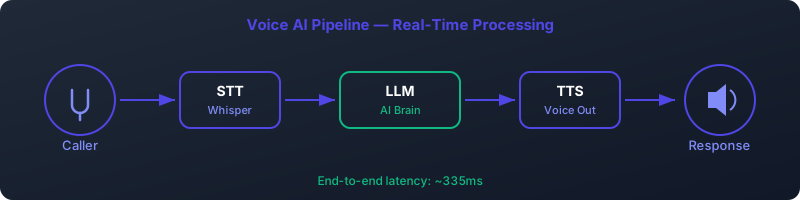
The magic of a conversational AI receptionist happens through a sophisticated, real-time pipeline. The entire process, from the moment a caller speaks to the AI's response, must happen in a fraction of a second to feel natural. This is known as the Speech-to-Text → Large Language Model → Text-to-Speech pipeline.
Caller Speaks → [1. STT] → Text → [2. LLM] → Response Text → [3. TTS] → AI Voice → Caller Hears- Speech-to-Text (STT): The AI's "ears." When the caller speaks, the audio stream is instantly converted into written text. Leading STT engines like OpenAI's Whisper (v3) or Deepgram's Nova-2 can achieve high accuracy even with challenging accents and background noise.
- Large Language Model (LLM): The "brain." The transcribed text is sent to an LLM like OpenAI's GPT-4o, Anthropic's Claude 3, or a self-hosted model like Llama 3. The LLM analyzes the text for intent, retrieves necessary information (e.g., from a CRM or calendar), and formulates a coherent, context-aware response. This is where the core logic and "thinking" happens. For more on this, see our guide on LLM integration strategies.
- Text-to-Speech (TTS): The "voice." The LLM's text response is sent to a TTS engine, which converts it back into audible speech. The quality of the TTS is critical for a human-like experience. Services like ElevenLabs, Play.ht, and open-source models like Coqui's mixael-TTS are popular choices for generating natural-sounding, low-latency audio.
This entire cycle must complete in under 500 milliseconds to avoid awkward pauses and allow for natural conversational turn-taking.
Core Capabilities of the Best AI Receptionist in 2026
A truly effective automated receptionist AI goes beyond simply answering the phone. It acts as a powerful front-line agent for your business. Here are the key capabilities to look for.
Natural, Human-Like Conversation
This is the cornerstone. The AI should be able to understand complex queries, handle conversational tangents, and maintain context throughout the call. It should sound empathetic and professional, not robotic. The goal is for the caller to forget they're speaking to an AI.
Intelligent Appointment Booking & Rescheduling
A top-tier AI receptionist integrates directly with your calendar systems (Google Calendar, Outlook 365). It can check for availability in real-time, book appointments based on specific criteria (e.g., "a 30-minute consultation with Dr. Smith next Tuesday afternoon"), and handle complex rescheduling requests ("Can we move my 2 PM appointment to sometime on Friday?").
24/7 Instant FAQ Answering
Your AI can be trained on a knowledge base of your company's information—FAQs, product details, business hours, location, policies, and more. It can provide instant, accurate answers 24/7, freeing up human staff from repetitive inquiries and ensuring customers are never left waiting.
Smart Call Routing & Transfers
When a caller's request requires human intervention, the AI must intelligently route the call. Instead of just transferring to a general department, it can ask qualifying questions ("Are you calling about a new or existing legal case?") to determine the exact person or team needed and perform a warm transfer, providing the human agent with a summary of the conversation so far.
Advanced Features: Barge-in and Sentiment Analysis
- Barge-in: This is the ability for a caller to interrupt the AI while it's speaking, just like in a normal human conversation. It's a critical feature for preventing frustration and making the interaction feel fluid. The AI must stop talking immediately and process the new input.
- Sentiment Analysis: Modern AIs can detect the caller's emotional state (e.g., frustrated, happy, confused). This allows the AI to adjust its tone or, if it detects high levels of frustration, immediately escalate the call to a human manager.
The Critical Decision: Build vs. Buy Your AI Receptionist
One of the first major decisions in this AI receptionist guide is whether to use a pre-built SaaS platform or build a custom, self-hosted solution. Each path has significant trade-offs in terms of cost, control, and complexity.
| Factor | Buy (SaaS Platform) | Build (Self-Hosted) |
|---|---|---|
| Speed to Deploy | Fast (Hours to Days) | Slow (Weeks to Months) |
| Upfront Cost | Low (Often $0) | High (Developer time, server setup) |
| Ongoing Cost | Per-minute usage fees | Lower (Server costs, open-source models) |
| Customization & Control | Limited to platform features | Nearly unlimited |
| Maintenance | Handled by the provider | Your responsibility |
| Data Privacy | Reliant on provider's compliance (e.g., HIPAA BAA) | Full control over data residency and security |
Option 1: Buy a SaaS Platform (The Fast Lane)
SaaS (Software as a Service) platforms provide all the underlying infrastructure—telephony, STT, LLM, and TTS—in a single, easy-to-use package. You simply configure your agent's personality, knowledge base, and goals through a web interface. These are excellent for businesses that want to get started quickly without a dedicated engineering team.
- Vapi.ai: A developer-focused platform known for its low latency and high customizability. Great for building complex, function-calling agents.
- Pros: Excellent developer experience, sub-500ms latency, robust API.
- Cons: Can be more technical than other options.
- Pricing: Starts around $0.04/minute.
- Retell AI: Focuses on providing a highly reliable, high-concurrency voice API. They have a proprietary LLM component designed for conversational turn-taking.
- Pros: Very high-quality voice, handles barge-in exceptionally well.
- Cons: Less flexible on the choice of underlying models.
- Pricing: Starts around $0.05/minute.
- Synthflow: A more user-friendly, no-code/low-code platform designed for agencies and businesses without deep technical expertise.
- Pros: Easy-to-use visual builder, quick setup.
- Cons: Less granular control than developer-first platforms.
- Pricing: Tiered plans, with usage costs around $0.06/minute.
- Bland AI: A platform focused on high-volume outbound calling and simple inbound agents. Very fast to get started.
- Pros: Extremely simple API, cost-effective for large scale. - Cons: Can be less "intelligent" or conversational for complex inbound tasks.
- Pricing: Highly competitive, often below $0.03/minute for volume.
Option 2: Build a Self-Hosted Solution (The Power User's Path)
Building your own virtual AI receptionist gives you ultimate control over every component, from the voice of the AI to data privacy. This path is ideal for companies with specific compliance needs (like HIPAA), a desire to fine-tune models, or the goal of achieving the lowest possible long-term operational cost.
The Open-Source Tech Stack
- Telephony Server: Asterisk is the industry-standard open-source PBX. You'll use it to manage phone numbers, SIP trunks, and the real-time audio stream. It connects to the outside world via a carrier like Twilio or Bandwidth.
- Speech-to-Text (STT): Run a local instance of Whisper (e.g., via `whisper.cpp` on a GPU server) for real-time transcription. This keeps audio data on your servers.
- Large Language Model (LLM): Use a framework like LLM backend to serve open-source models like Meta's Llama 3 or Mistral's Mixtral 8x7B. This gives you full control and avoids per-token API fees.
- Text-to-Speech (TTS): For the highest quality and brand consistency, use Coqui's mixael-TTS model. It allows for "voice cloning" from just a few seconds of audio, meaning your AI can speak with a custom voice—even yours.
Pros & Cons of Building
- Pros:
- Total Data Control: All data, including sensitive call recordings, stays within your infrastructure. Essential for HIPAA or legal applications.
- Cost at Scale: After the initial setup, your only ongoing costs are server hosting and telephony, which can be significantly cheaper than per-minute SaaS fees.
- Infinite Customization: Fine-tune every aspect of the AI's behavior, voice, and integration logic.
- Cons:
- High Complexity: Requires expertise in telephony (SIP, RTP), AI model hosting, and real-time application development.
- Maintenance Overhead: You are responsible for server uptime, model updates, and security.
- Latency Challenges: Achieving sub-500ms latency on a self-hosted stack is a significant engineering challenge.
Navigating Industry-Specific Compliance and Requirements
An AI receptionist handles sensitive information, making industry-specific compliance a non-negotiable requirement. Choosing a solution without considering these regulations can lead to severe legal and financial penalties.
Healthcare: HIPAA & GDPR
If your AI handles Protected Health Information (PHI), it must be HIPAA compliant.
- For SaaS (Buy): The provider MUST sign a Business Associate Agreement (BAA). Do not use a provider that will not sign a BAA. Confirm their data handling and encryption policies.
- For Self-Hosted (Build): You control the environment. Ensure all servers are in a HIPAA-compliant hosting environment (like AWS a dedicated private cloud), data is encrypted at rest and in transit, and you have strict access controls.
Legal: Attorney-Client Privilege
Conversations with a law firm's AI receptionist could contain privileged information.
- For SaaS (Buy): This is a grey area. Relying on a third-party to handle privileged communications can be risky. Scrutinize the provider's terms of service and data privacy policies.
- For Self-Hosted (Build): This is the safest route for law firms. A self-hosted solution ensures that no third party ever has access to the conversation data, preserving the integrity of attorney-client privilege.
Finance: PCI DSS and Data Security
If your AI will handle payments or collect credit card information (which is generally not recommended for voice AI yet), it must comply with the Payment Card Industry Data Security Standard (PCI DSS).
- Most AI receptionist platforms are NOT PCI compliant for taking payments over the phone. The standard practice is to transfer the caller to a secure, human-operated payment line or send a secure payment link via SMS.
The Sound of AI: Voice Quality and Latency Deep Dive
The two factors that make or break the user experience are the quality of the AI's voice and the speed of its response. People are unforgiving of robotic voices and awkward silences.
Voice Quality: Cloud TTS vs. Self-Hosted Voice Cloning (mixael-TTS)
The voice of your AI is the voice of your brand.
- Cloud TTS (e.g., ElevenLabs, Google TTS): These services offer a wide range of high-quality, pre-made voices. They are incredibly easy to use (just an API call) and are optimized for low latency. The downside is a recurring cost and a voice that other companies might also be using.
- Self-Hosted mixael-TTS (e.g., Coqui mixael-TTS): This open-source model represents a breakthrough in voice cloning. By providing just 10-30 seconds of a target voice, you can generate a high-quality, custom TTS model that sounds just like the source. This allows for a unique, branded voice. The trade-off is the complexity of hosting the model and ensuring low-latency inference, which typically requires a dedicated GPU.
The 500ms Rule: Why Latency is King for Natural Conversation
In human conversation, the typical time between one person finishing speaking and the other starting is 200-500 milliseconds. If an AI takes longer than this, the conversation feels stilted and unnatural. Achieving this "end-to-end" latency is the primary technical challenge for any AI phone receptionist.
To achieve this, every part of the pipeline must be optimized for streaming. The AI shouldn't wait for the caller to finish speaking before starting transcription. It shouldn't wait for the LLM's full response before starting speech synthesis. Everything happens in parallel, in tiny chunks, to keep the conversation flowing.
Integration Is Everything: Connecting Your AI to Your Business
A standalone AI receptionist is a novelty. An integrated AI receptionist is a powerhouse. The ability to connect to your existing business systems is what unlocks true automation and value.
CRM Integration (Salesforce, HubSpot)
Connecting your AI to your Customer Relationship Management (CRM) system allows it to:
- Identify Callers: Recognize an incoming phone number and greet the caller by name ("Hi Jane, welcome back to Acme Corp.").
- Provide Context: Access the caller's history to understand their previous orders, support tickets, or interactions.
- Automate Data Entry: Automatically log the call, create a transcript, summarize the conversation, and create new leads or support tickets in the CRM.
Calendar Integration (Google Calendar, Microsoft Outlook)
This is the key to automated appointment booking. The AI needs API access to:
- Read Availability: Check calendars for multiple staff members to find open slots.
- Write Events: Create new appointments directly on the calendar, including details like the caller's name, phone number, and reason for the appointment.
- Update/Cancel Events: Process rescheduling and cancellation requests automatically.
Connecting to Other Business Systems
The possibilities are endless. Using APIs or tools like Zapier, your AI can connect to:
- Booking Platforms: Acuity, Calendly, or industry-specific systems.
- E-commerce Platforms: Shopify or WooCommerce to check order statuses.
- Support Desks: Zendesk or Jira to create or update tickets.
Your Go-Live Plan: The AI Receptionist Deployment Checklist
Deploying an AI receptionist requires careful planning. Follow this checklist to ensure a smooth rollout.
- Define Goals & Scope: What specific tasks will the AI handle? (e.g., booking sales demos, answering billing questions). What are your key success metrics? (e.g., reduce human call time by 50%).
- Choose Your Path: Make the critical Build vs. Buy decision based on your resources, timeline, and compliance needs.
- Select Your Tools: If buying, choose a SaaS provider. If building, finalize your tech stack (Asterisk, LLM backend, etc.).
- Design the Conversation Flow: Script the AI's greeting, define its personality (e.g., friendly, formal), and create the core logic for handling different intents.
- Build the Knowledge Base: Compile all the information the AI needs to answer questions accurately. This could be a simple document or a connection to a database.
- (If Building/Cloning) Create the Voice: Record 15-30 seconds of high-quality, clean audio of your desired voice for the mixael-TTS model.
- Integrate with Systems: Connect the AI to your CRM, calendar, and any other necessary APIs. This is a critical and often time-consuming step.
- Test, Test, Test: Conduct extensive internal testing. Try to "break" the AI with difficult questions, strange accents, and interruptions. Test all integrations thoroughly.
- Phased Rollout: Don't switch 100% of your calls overnight. Start by routing a small percentage of calls (e.g., 10%) to the AI. Monitor performance closely.
- Monitor & Iterate: Use call transcripts and analytics to identify areas where the AI is failing or could be improved. Continuously update its knowledge base and conversation logic.
Measuring Success: Calculating the ROI of Your Automated Receptionist AI
The business case for an automated receptionist AI is compelling, but you need to prove its value with data. Here’s a simple framework for calculating your Return on Investment (ROI).
ROI Formula:
[(Value of Human Hours Saved) + (Value of New Opportunities)] - (Total AI Cost)
Let's break down the components:
- Total AI Cost:
- SaaS Model: (Per-Minute Rate * Total Minutes) + Monthly Platform Fee + Telephony Costs.
- Build Model: Monthly Server Hosting Costs + Telephony Costs + (Initial Developer Cost / 12 for a one-year amortization).
- Value of Human Hours Saved:
- Calculate the number of calls the AI handles per month.
- Multiply by the average call duration. This gives you total minutes handled.
- Convert minutes to hours and multiply by the fully-loaded hourly wage of the human receptionist or agent who would have taken those calls.
- Example: 1,000 calls/mo * 3 min/call = 3,000 mins = 50 hours. 50 hours * $25/hour = $1,250 saved per month.
- Value of New Opportunities:
- Track how many new appointments or qualified leads the AI books.
- Multiply this by your average lead-to-close rate and the average value of a new customer.
- This also includes the value of calls that would have been missed after hours but were captured by the 24/7 AI.
By tracking these metrics, you can clearly demonstrate the financial impact of your AI receptionist and justify further investment in the technology.
The Future is Calling: What's Next for AI Receptionists?
The technology is advancing at an incredible pace. The best AI receptionist 2026 will have capabilities that seem like science fiction today. Here's a glimpse into the future.
Multimodal Conversations
The distinction between a phone call and a video call will blur. AI receptionists will be able to start a conversation on the phone and seamlessly transition to a video chat to share a screen, show a product demo, or use a digital avatar for a more personal interaction.
Proactive Outreach
Instead of just reacting to inbound calls, AI agents will proactively engage with customers. They will make outbound calls for:
- Appointment reminders and confirmations.
- Feedback surveys after a service.
- Lead qualification for sales teams.
- Payment reminders.
Hyper-Personalization and Memory
Future AIs will have a persistent memory of every interaction with a customer across all channels (phone, email, chat). When a customer calls, the AI will know their entire history with the company, allowing for a deeply personalized and efficient conversation. It won't just know your name; it will remember the details of your last call three months ago.
Frequently Asked Questions
What is the main difference between an AI receptionist and a traditional IVR?
The main difference is intelligence and conversational ability. A traditional IVR uses a rigid "press-button" menu system. An AI receptionist uses a Large Language Model (LLM) to understand natural language, engage in fluid, human-like conversation, and perform complex tasks that are not pre-scripted.
How much does an AI receptionist cost?
Costs vary based on the "Build vs. Buy" model. Buying a SaaS solution typically costs between $0.03 and $0.06 per minute of call time, plus potential platform fees. Building your own is cheaper long-term, with costs limited to server hosting and telephony (often under $0.01/min), but requires