Table of Contents
- What You'll Build: A Conversational AI Phone Bot in Python
- The 5-Step Architecture of Our Python Voice Bot
- Prerequisites: Your Toolkit for Building an AI Call Bot
- Step 1: Setting Up Your Development Environment
- Step 2: The Complete AI Phone Bot Python Script (Under 100 Lines)
- Step 3: A Deep Dive into the Python Code
- Step 4: Testing Your Asterisk Python AI Agent
- Troubleshooting: Common Errors and Fixes
- Next Steps: From Prototype to Production-Ready
- Frequently Asked Questions
What You'll Build: A Conversational AI Phone Bot in Python
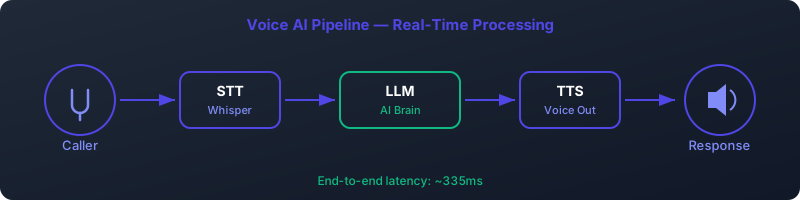
Imagine a phone bot that doesn't just play pre-recorded messages but actively listens, understands, and converses. A bot that can answer questions, schedule appointments, or provide support with human-like intelligence. That's not science fiction from 2026; it's what you're about to build today. In this comprehensive, beginner-friendly tutorial, we will create a powerful AI phone bot Python script from the ground up.
You will write a single Python script that integrates with the open-source telephony platform Asterisk. This script will leverage a stack of cutting-edge, locally-run AI models to achieve real-time conversation. By the end, you'll have a functional prototype that can answer a phone call, transcribe what the caller says, generate an intelligent response using a Large Language Model (LLM), and speak that response back to the caller.
This guide is designed for developers in the USA and UK who are comfortable with Python and want to dive into the exciting world of conversational AI and telephony. Whether you're looking to build a personal project or prototype a next-generation customer service agent, this is your starting point to build an AI phone bot.
The 5-Step Architecture of Our Python Voice Bot
The magic behind our Python AI phone bot lies in a simple, modular architecture. Each component has a specific job, and they work in sequence to create a seamless conversational flow. Understanding this flow is key to customizing and expanding your bot later.
The Conversational Flow
- An incoming phone call arrives at your Asterisk server.
- Asterisk executes your Python script via EAGI, streaming the caller's raw audio directly to it.
- Your script captures the audio, sending it to a Whisper model for highly accurate speech-to-text transcription.
- The resulting text is fed into an LLM backend-powered Large Language Model (LLM) to generate a contextually relevant response.
- The LLM's text response is synthesized into speech by an mixael-TTS model, and the audio is played back to the caller over the phone line.
This entire process repeats in a loop, allowing for a back-and-forth conversation. The use of local models via LLM backend gives you complete control over your data, privacy, and operational costs—a significant advantage over cloud-based APIs.
Prerequisites: Your Toolkit for Building an AI Call Bot
Before we write a single line of code, let's gather the necessary tools. This project uses a stack of powerful open-source software. Here’s what you’ll need:
- Python 3.10+: The language we'll use to write our bot's logic. Make sure you have `pip` and `venv` available.
- Asterisk: The world's most popular open-source PBX (Private Branch Exchange). It will handle all the telephony heavy lifting, like managing SIP calls and connecting them to our script.
- LLM backend: An incredible tool for running open-source LLMs (like Llama 3, Mistral, etc.) locally on your machine. This will be the "brain" of our bot.
- Whisper & mixael-TTS Servers: We'll need API endpoints for a Speech-to-Text (STT) model (Whisper) and a Text-to-Speech (TTS) model (mixael-TTS). We'll discuss setting up simple servers for these.
- A GPU (Recommended): While this project *can* run on a CPU, it will be very slow. Transcribing audio and generating LLM responses are computationally intensive. A modern NVIDIA GPU with at least 8GB of VRAM is highly recommended for a near-real-time experience.
- A Softphone: A software-based phone client like Zoiper (free version is sufficient) to test your bot by making calls from your computer.
Step 1: Setting Up Your Development Environment
With the prerequisites understood, let's get everything installed and configured. This is the most crucial part of building your AI call bot Python project.
Installing and Configuring Asterisk
Asterisk is the bridge between the telephone network and our Python script. On a Debian-based system (like Ubuntu), installation is straightforward:
sudo apt-get update
sudo apt-get install -y asterisk
Once installed, we need to tell Asterisk what to do when a call comes in. This is done in the `extensions.conf` file, which controls the "dialplan."
- Open the dialplan configuration file: `sudo nano /etc/asterisk/extensions.conf`.
- Scroll to the `[default]` context (or create it if it doesn't exist) and add the following lines. We'll use extension `1000` for our bot.
[default]
exten => 1000,1,Answer()
 same => n,Verbose(1, "--- Starting AI Phone Bot ---")
 same => n,EAGI(agent.py)
 same => n,Hangup()
Let's break this down:
exten => 1000,1,Answer(): When someone dials extension 1000, Asterisk answers the call.same => n,Verbose(...): Logs a helpful message to the Asterisk console.same => n,EAGI(agent.py): This is the key command. It executes our Python script `agent.py` using the Enhanced AGI protocol, which allows two-way audio streaming.same => n,Hangup(): Once the script finishes, Asterisk hangs up the call.
/var/lib/asterisk/agi-bin/. It also must be executable.
Setting Up AI Services: LLM backend, Whisper, and mixael-TTS
Our Python script will communicate with three separate AI services via HTTP APIs. For this tutorial, we'll assume you are running them locally. The open-source community has made this remarkably easy.
-
LLM backend (LLM):
- Follow the official instructions to install LLM backend for your OS.
- Pull a model. We recommend `llama3:8b` for a good balance of speed and intelligence.
ollama pull llama3:8b - LLM backend automatically exposes an API at `http://localhost:11434`.
-
Whisper (STT):
- There are many ways to serve a Whisper model. A popular and efficient choice is to use the server provided with `whisper.cpp`.
- Follow the `whisper.cpp` build instructions and run its server. It will expose an endpoint like `http://localhost:8080/inference`. For simplicity, our code will target a generic `/transcribe` endpoint. You may need to adapt the code to your specific Whisper API server's endpoint and payload format.
-
mixael-TTS (TTS):
- Coqui's mixael-TTSv2 is a fantastic, high-quality, open-source TTS model. The easiest way to run it is via Docker.
- Search for a "mixael-TTS API server" on Docker Hub or GitHub. Many community-maintained images are available.
- Once running, it will provide a `/tts` endpoint that accepts text and returns a `.wav` file, typically at `http://localhost:8020/tts`.
With our infrastructure in place, we can finally focus on the heart of our project: the Python code.
Step 2: The Complete AI Phone Bot Python Script (Under 100 Lines)
Create a file named `agent.py` inside `/var/lib/asterisk/agi-bin/`. Make it executable with `sudo chmod +x /var/lib/asterisk/agi-bin/agent.py` and ensure its owner is the same user Asterisk runs as (often `asterisk:asterisk`).
Here is the complete, heavily commented code for our Asterisk Python AI agent. Copy and paste this into your `agent.py` file.
#!/usr/bin/env python3
import sys
import os
import requests
import wave
import audioop
import time

# --- Configuration ---
# API Endpoints for our AI services
OLLAMA_API_URL = "http://localhost:11434/api/generate"
WHISPER_API_URL = "http://localhost:8080/transcribe" # Adjust if your whisper server is different
mixael-TTS_API_URL = "http://localhost:8020/tts"

# Audio settings
SAMPLE_RATE = 16000  # Use 16kHz for better STT performance
CHUNK_SIZE = 320  # 20ms of audio in 16-bit PCM
SILENCE_THRESHOLD = 300  # RMS value to detect silence
SILENCE_DURATION = 25  # How many consecutive silent chunks to wait for (25 * 20ms = 0.5s)

# AGI related
AUDIO_FD = 3 # File descriptor for EAGI audio
TMP_WAV_PATH = "/tmp/response.wav"
AGI_TMP_PATH = "/tmp/response" # AGI plays without extension

class AiPhoneBot:
    """A class to manage the AI phone bot conversation via Asterisk EAGI."""

    def __init__(self):
        # Redirect stderr to a log file for debugging
        sys.stderr = open('/tmp/agi_debug.log', 'w')
        self.log("--- AI Phone Bot Script Started ---")

    def log(self, message):
        """Log messages to the debug file."""
        print(message, file=sys.stderr, flush=True)

    def read_audio(self):
        """Read audio from EAGI, detect end of speech, and return audio data."""
        self.log("Listening for user input...")
        audio_frames = []
        silent_chunks = 0

        while True:
            try:
                # Read 20ms of 16-bit signed linear PCM audio from file descriptor 3
                chunk = os.read(AUDIO_FD, CHUNK_SIZE * 2)
                if not chunk:
                    break

                audio_frames.append(chunk)
                rms = audioop.rms(chunk, 2)  # 2 = 16-bit width

                if rms < SILENCE_THRESHOLD:
                    silent_chunks += 1
                else:
                    silent_chunks = 0

                if silent_chunks >= SILENCE_DURATION:
                    self.log("End of speech detected.")
                    break
            except Exception as e:
                self.log(f"Error reading audio: {e}")
                break

        return b''.join(audio_frames)

    def transcribe(self, audio_data):
        """Send audio data to Whisper API for transcription."""
        self.log("Transcribing audio...")
        try:
            # Create a temporary WAV file for the API
            with wave.open("/tmp/request.wav", "wb") as wf:
                wf.setnchannels(1)
                wf.setsampwidth(2)
                wf.setframerate(SAMPLE_RATE)
                wf.writeframes(audio_data)

            with open("/tmp/request.wav", "rb") as f:
                # NOTE: Your Whisper API might expect a different format/payload
                response = requests.post(WHISPER_API_URL, files={'file': f})
                response.raise_for_status()
                return response.json().get("text", "").strip()
        except Exception as e:
            self.log(f"Whisper transcription failed: {e}")
            return ""

    def respond(self, text):
        """Get a response from the LLM backend LLM."""
        self.log(f"Getting LLM response for: '{text}'")
        try:
            payload = {
                "model": "llama3:8b",
                "prompt": f"You are a helpful phone assistant. The user said: '{text}'. Respond concisely in one sentence.",
                "stream": False
            }
            response = requests.post(OLLAMA_API_URL, json=payload)
            response.raise_for_status()
            # Extract the first sentence of the response
            full_response = response.json().get("response", "")
            return full_response.split('.')[0] + '.'
        except Exception as e:
            self.log(f"LLM backend API request failed: {e}")
            return "I'm sorry, I'm having trouble thinking right now."

    def speak(self, text):
        """Synthesize text to speech and play it back to the caller."""
        self.log(f"Speaking: '{text}'")
        try:
            payload = {"text": text, "speaker_wav": "female.wav", "language": "en"} # Adjust speaker/language
            response = requests.post(mixael-TTS_API_URL, json=payload, stream=True)
            response.raise_for_status()

            with open(TMP_WAV_PATH, "wb") as f:
                for chunk in response.iter_content(chunk_size=8192):
                    f.write(chunk)

            # Use AGI STREAM FILE command to play the audio
            sys.stdout.write(f'STREAM FILE {AGI_TMP_PATH} "#"\n')
            sys.stdout.flush()
            # Wait for Asterisk to respond (it sends a result line)
            sys.stdin.readline()
        except Exception as e:
            self.log(f"TTS/Playback failed: {e}")

    def run(self):
        """The main conversation loop."""
        self.speak("Hello, how can I help you today?")
        while True:
            audio_data = self.read_audio()
            if not audio_data:
                self.log("No audio received, ending call.")
                break

            user_text = self.transcribe(audio_data)
            if not user_text:
                self.log("Transcription failed or empty.")
                self.speak("I'm sorry, I didn't catch that. Could you please repeat?")
                continue

            self.log(f"User said: '{user_text}'")

            if "goodbye" in user_text.lower():
                self.speak("Goodbye!")
                break

            response_text = self.respond(user_text)
            self.speak(response_text)

if __name__ == "__main__":
    bot = AiPhoneBot()
    bot.run()
    bot.log("--- AI Phone Bot Script Finished ---")
Step 3: A Deep Dive into the Python Code
Let's dissect the `AiPhoneBot` class function by function to understand exactly how it works. This is the core of our Python voice bot.
Initialization and Constants
The script starts by defining constants for API endpoints, audio parameters, and file paths. The `__init__` method is simple but crucial: it redirects `stderr` to a log file. AGI scripts communicate with Asterisk over `stdin` and `stdout`, so we can't just `print()` for debugging. All our `self.log()` calls will write to `/tmp/agi_debug.log`, which is invaluable for troubleshooting.
read_audio() and detect_speech_end(): Listening to the Caller
The `read_audio` function is where we interact with EAGI's audio stream. Asterisk sends raw audio data to our script on file descriptor `3`. - `os.read(AUDIO_FD, CHUNK_SIZE * 2)` reads a small chunk of audio. We read `CHUNK_SIZE * 2` bytes because each sample is 16-bit (2 bytes). - `audioop.rms(chunk, 2)` calculates the Root Mean Square of the audio chunk. This is a simple way to measure its volume. - The code checks if the volume (`rms`) is below `SILENCE_THRESHOLD`. If it stays silent for a set number of chunks (`SILENCE_DURATION`), we assume the user has finished speaking and break the loop. This is a basic form of Voice Activity Detection (VAD).
transcribe(): Converting Speech to Text with Whisper
Once we have the user's utterance as raw audio data, we need to convert it to text. - The function first saves the raw audio data into a temporary `.wav` file. Most STT APIs, including many Whisper servers, prefer to receive a standard file format. - It then opens this file and `POST`s it to the `WHISPER_API_URL`. - Finally, it parses the JSON response to extract the transcribed text. Error handling ensures that if the transcription fails, it returns an empty string.
respond(): Generating a Smart Reply with LLM backend
This is where the "intelligence" of our AI phone bot Python script comes from. - We take the transcribed text from the user. - We create a JSON payload for the LLM backend API, specifying the model (`llama3:8b`) and a carefully crafted prompt. The prompt instructs the LLM on its persona ("a helpful phone assistant") and task ("Respond concisely in one sentence"). - We `POST` this to the `OLLAMA_API_URL`. - We parse the response and, for simplicity and to keep responses brief, we extract