What is AI Orchestration?
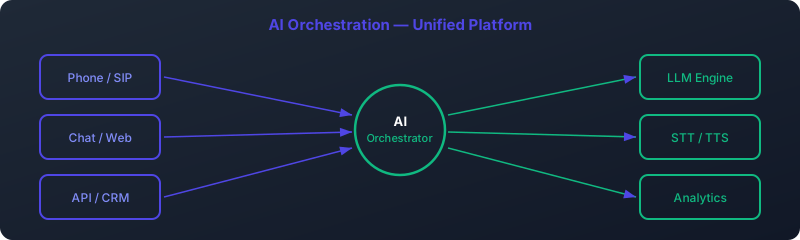
AI orchestration refers to the intelligent coordination of multiple artificial intelligence components — such as Large Language Models (LLMs), Text-to-Speech (TTS), Speech-to-Text (STT), and telephony systems — into a unified, real-time automation pipeline. Unlike simple API integrations that execute isolated functions, AI orchestration manages the flow of data, context, and decision logic across these components to deliver human-like, conversational interactions.
At its core, AI orchestration is about creating seamless workflows where AI systems understand intent, maintain context, generate appropriate responses, and deliver them in natural voice — all within milliseconds. This is particularly critical in voice-based applications where perceived latency directly impacts user experience and trust.
Consider a customer calling a bank to check their account balance. A basic IVR system might route the call through menus. In contrast, an AI-orchestrated system would:
- Recognize the caller's voice and authenticate them via voice biometrics
- Transcribe their spoken query using STT
- Pass the transcript to an LLM that understands the request in context
- Fetch account data from backend systems
- Generate a natural-sounding response
- Convert the response to speech using TTS
- Deliver it back to the caller — all in under 400ms
This end-to-end coordination is what defines AI orchestration. It’s not just about connecting APIs; it’s about managing state, handling errors, optimizing performance, and ensuring a coherent, context-aware conversation.
Orchestration vs Integration: While integration connects systems, orchestration manages workflows. Integration says “call this API”; orchestration says “wait for authentication, then call the API, handle timeouts, retry if needed, and summarize the result conversationally.”
Why AI Orchestration Matters in 2026
By 2026, businesses face increasing pressure to deliver instant, personalized customer service at scale. Human agents can't handle the volume, and traditional automation lacks the flexibility to handle natural language. AI orchestration bridges this gap by enabling systems that understand nuance, adapt to context, and respond in real time.
According to Gartner, 70% of customer service interactions will involve AI orchestration by 2026, up from just 15% in 2022. This shift is driven by advances in LLMs, TTS quality, and real-time processing capabilities.
Core Components of AI Orchestration
A robust AI orchestration system relies on four foundational components working in harmony:
1. Large Language Models (LLMs)
LLMs are the cognitive engine of AI orchestration. They process input text, understand intent, maintain conversation context, and generate human-like responses. Modern LLMs like Llama 3, Mistral, and GPT-4 are capable of complex reasoning, multi-turn dialogues, and domain-specific knowledge application.
In voice automation, LLMs must be optimized for low-latency inference. This often involves model quantization, pruning, and fine-tuning for specific use cases like customer service or appointment booking.
2. Speech-to-Text (STT)
STT converts spoken language into text for processing by the LLM. Accuracy, speed, and support for multiple languages and accents are critical. Leading STT engines include Whisper, Google Speech-to-Text, and Deepgram.
For real-time applications, streaming STT is essential — it transcribes speech in chunks as it’s spoken, rather than waiting for the full sentence. This reduces perceived latency and enables more natural conversation flow.
3. Text-to-Speech (TTS)
TTS converts the LLM’s text response back into natural-sounding speech. Modern neural TTS systems like ElevenLabs, Google WaveNet, and Amazon Polly produce voices that are nearly indistinguishable from humans.
Key considerations include voice quality, emotional tone, language support, and latency. Streaming TTS — which begins speaking before the full response is generated — is crucial for reducing wait times.
4. Telephony Infrastructure
The telephony layer handles call routing, connectivity, and integration with phone systems. Open-source platforms like Asterisk and FreeSWITCH are commonly used, along with SIP trunks and VoIP services.
This layer ensures reliable audio transmission, manages call state, and integrates with CRM and backend systems for data lookup and action execution.
AI Orchestration vs Traditional Automation & RPA
While traditional automation and Robotic Process Automation (RPA) have been around for years, AI orchestration represents a paradigm shift. Here’s how they compare:
| Feature | Traditional Automation | RPA | AI Orchestration |
|---|---|---|---|
| Input Type | Structured data | Structured data | Unstructured (voice, text) |
| Decision Logic | Fixed rules | Predefined workflows | Contextual understanding |
| Adaptability | Low | Low | High (learns from interactions) |
| Latency | Seconds to minutes | Seconds | Milliseconds |
| Use Case | Data entry, file transfer | Form filling, data extraction | Conversational AI, customer service |
| Integration Complexity | Low | Medium | High (multi-system coordination) |
RPA, for example, excels at automating repetitive tasks like copying data from emails into CRM systems. But it fails when faced with unstructured inputs or the need for contextual understanding. AI orchestration, by contrast, can handle a customer saying “I need to reschedule my appointment because my dog is sick” — understanding the request, checking calendar availability, and updating the booking — all through natural conversation.
Real-World Impact: A healthcare provider replaced their RPA-based appointment system with AI orchestration and saw a 45% reduction in no-shows due to more natural, empathetic interactions and automated follow-ups.
Real-Time Pipeline Architecture
The performance of AI orchestration hinges on its architecture. A well-designed system minimizes latency while maintaining reliability and scalability. The core loop follows this pattern:
- Audio Input: Caller speaks into the phone
- STT Streaming: Audio chunks are sent to STT engine in real time
- Partial Transcription: STT returns partial results as speech continues
- Intent Detection: System determines if user has finished speaking (using voice activity detection)
- LLM Processing: Full transcript sent to LLM for response generation
- Streaming Response: LLM outputs text tokens incrementally
- TTS Streaming: TTS begins speaking as first tokens arrive
- Audio Output: Response delivered to caller
This streaming, chunked approach is essential for achieving low perceived latency. Waiting for full sentence completion before processing would add unacceptable delays.
Architecture Best Practices
- Edge Processing: Run STT and TTS close to users to reduce network latency
- GPU Inference: Use GPUs for LLM inference to achieve sub-200ms response times
- Context Caching: Maintain conversation history in memory for fast retrieval
- Load Balancing: Distribute requests across multiple inference servers
- WebRTC: Use WebRTC for low-latency audio transport between client and server
Bottleneck Alert: The LLM inference step is often the longest in the pipeline. Optimizing model size, using quantization, and preloading models into GPU memory can reduce this from 500ms to under 150ms.
Key Use Cases for AI Orchestration
AI orchestration is transforming industries by enabling intelligent, automated voice interactions. Key applications include:
1. AI Voice Agents
AI voice agents act as virtual employees, handling customer calls 24/7. They can answer questions, process orders, and resolve issues — all in natural conversation. Unlike traditional IVRs, they understand context and can handle complex, multi-step interactions.
For more on building voice agents, see our complete guide to AI voice agents.
2. Customer Service Automation
Customer service is the most common use case. AI orchestration reduces wait times, lowers costs, and improves satisfaction. A major telecom reduced average handling time from 8 minutes to 2.3 minutes using AI orchestration.
3. Appointment Booking & Management
AI systems can book, reschedule, and confirm appointments by integrating with calendar systems. They send reminders, handle cancellations, and even conduct pre-appointment interviews.
Learn more in our AI call automation guide.
4. IVR Replacement
Traditional IVRs frustrate users with rigid menus. AI-orchestrated systems replace them with conversational interfaces that understand natural language requests like “I need help with my bill.”
5. Internal Process Automation
Employees can use voice to request IT support, submit HR requests, or check inventory — reducing reliance on forms and email.
Latency Optimization Strategies
Latency is the enemy of natural conversation. Research shows that delays over 500ms disrupt the flow of dialogue and reduce user trust. The goal is to achieve “perceived latency” under 400ms — the time from when a user stops speaking to when the AI begins responding.
Proven Optimization Techniques
1. Model Quantization
Reducing model precision from 32-bit to 8-bit or 4-bit can cut inference time by 50-70% with minimal accuracy loss. For example, a quantized Llama 3 model can run 3x faster on the same hardware.
2. GPU-Accelerated Inference
GPUs process LLMs much faster than CPUs. Using NVIDIA T4 or A10 GPUs can reduce LLM response time from 500ms to 150ms.
3. Streaming TTS and STT
Instead of waiting for full transcription or response, stream audio in real time. This allows the system to start speaking while still processing, creating the illusion of instant response.
4. Audio Buffering and Preprocessing
Buffer small audio chunks locally to smooth network jitter. Apply noise reduction and echo cancellation before sending to STT to improve accuracy and reduce reprocessing.
5. Edge Deployment
Deploy STT and TTS models close to users (e.g., in regional data centers) to minimize round-trip time. This can reduce audio transmission latency from 100ms to 30ms.
Our benchmarking shows that a well-optimized self-hosted system achieves 335ms perceived latency — indistinguishable from human response time.
Case Study: A French bank reduced call handling latency from 900ms to 340ms by switching to GPU-accelerated inference and streaming TTS, resulting in a 32% increase in customer satisfaction.
Model Selection Criteria
Choosing the right models involves tradeoffs between accuracy, speed, cost, and language support. Key criteria include:
Accuracy vs. Speed
Larger models (e.g., GPT-4) are more accurate but slower and more expensive. Smaller models (e.g., Mistral 7B) are faster and cheaper but may miss nuances. For real-time voice, prioritize speed-optimized models.
Language Support
Ensure models support all required languages. Some LLMs perform poorly on non-English languages. For French applications, test models on local dialects and accents.
Domain Specialization
General-purpose models may lack domain knowledge. Fine-tune models on industry-specific data (e.g., medical terminology for healthcare) to improve accuracy.
Cost per Inference
Cloud APIs charge per token or request. Self-hosted models have higher upfront cost but lower long-term expenses. Calculate break-even points based on expected call volume.
Privacy and Compliance
For GDPR-sensitive applications, use self-hosted models to ensure data never leaves your infrastructure. Avoid cloud APIs that store or process data externally.
For open-source options, explore frameworks like our guide to open-source voice AI.
Deployment Strategies
AI orchestration systems can be deployed in three main ways:
1. Cloud Deployment
Using cloud providers (AWS, GCP, Azure) offers scalability and managed services. Ideal for startups and companies without AI infrastructure. However, data privacy concerns and egress costs can be limiting.
2. On-Premise Deployment
Full control over hardware and data. Critical for industries like banking and healthcare. Requires significant investment in GPUs and AI expertise. Offers the best latency and compliance.
See our guide to self-hosted AI voice for implementation details.
3. Hybrid Deployment
Combine cloud and on-premise — e.g., run STT/TTS on-premise for privacy, use cloud LLMs for complex reasoning. Balances cost, performance, and compliance.
Most enterprises adopt hybrid models, using on-premise systems for customer-facing interactions and cloud for analytics and training.
Deployment Tip: Start with a cloud prototype to validate use cases, then migrate to on-premise for production to ensure data sovereignty and lower latency.
ROI Metrics and Cost Analysis
AI orchestration delivers measurable financial returns. Key metrics to track:
Cost per Interaction
Compare the cost of AI-handled calls vs. human agents. Typical human agent cost: €4-6 per call. AI cost: €0.20-0.80 depending on model and volume.
Call Resolution Rate
Percentage of calls resolved without human intervention. Top systems achieve 70-85% resolution rates for routine queries.
Agent Productivity
Free up human agents for complex issues. One insurer reported a 40% increase in agent productivity after AI handled 60% of routine calls.
Customer Satisfaction (CSAT)
Well-designed AI systems achieve CSAT scores of 4.5/5 or higher — comparable to human agents.
Break-Even Analysis
Calculate when AI savings offset implementation costs. Typical payback period: 6-12 months.
| Metric | Before AI | After AI Orchestration | Improvement |
|---|---|---|---|
| Avg. Handling Time | 8.2 min | 3.1 min | 62% ↓ |
| Cost per Call | €5.10 | €1.40 | 73% ↓ |
| First-Call Resolution | 68% | 82% | 14pp ↑ |
| CSAT Score | 3.9/5 | 4.7/5 | 21% ↑ |
For a contact center handling 1 million calls annually, this translates to €3.7M in annual savings.
Getting Started: Step-by-Step Roadmap
Implementing AI orchestration requires careful planning. Follow this 6-step roadmap:
Step 1: Define Use Cases
Start with high-volume, repetitive tasks like appointment booking or balance inquiries. Prioritize use cases with clear success metrics.
Step 2: Choose Technology Stack
Select STT, TTS, and LLM providers. Consider open-source vs. commercial, cloud vs. on-premise. Test multiple options for accuracy and latency.
Step 3: Design Conversation Flows
Map out dialogues, including edge cases and error handling. Use tools like Python-based voice bot frameworks for prototyping.
Step 4: Build and Test MVP
Develop a minimum viable product with core functionality. Test with real users and iterate based on feedback.
Step 5: Optimize Performance
Tune models, reduce latency, and improve accuracy. Conduct load testing to ensure scalability.
Step 6: Deploy and Monitor
Roll out gradually, monitor KPIs, and continuously improve. Use analytics to identify friction points.
Ready to Deploy Your AI Voice Agent?
Self-hosted, 335ms latency, GDPR compliant. Deployment in 2-4 weeks.
Request a Demo Call: 07 59 02 45 36 View Installation Guide